
dialing field on the
campaign picks which.
The three modes
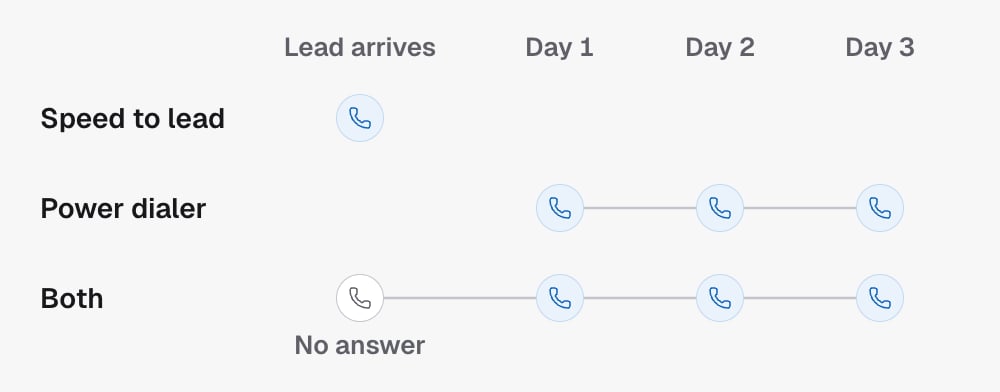
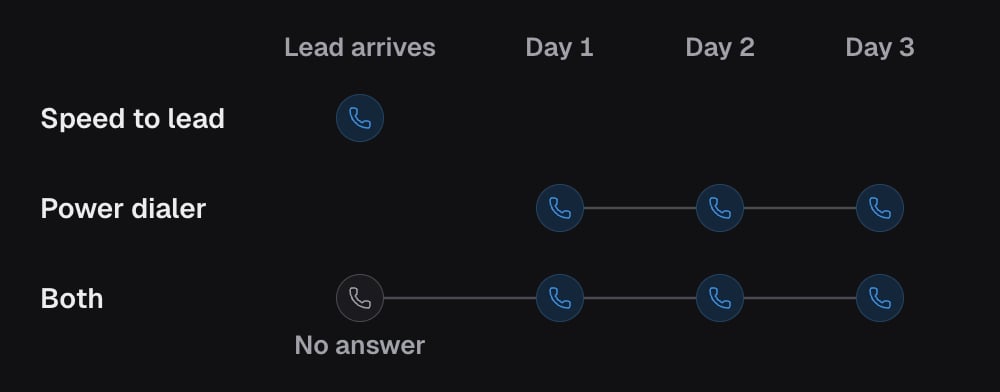
s2l when the lead has just raised their hand and speed is what wins,
such as a form fill or a missed call. Pick pd when the list is people who
need working over days, such as a reactivation list. Pick s2l_pd for new
leads you also refuse to give up on after one try.
If you omit dialing when creating an outbound campaign, it defaults to
s2l_pd. A confirmation campaign defaults to pd.
Two retired values remain in the response schema and cannot be set.
reactivation is still reported by campaigns created before it was retired,
which keep dialling exactly as before. confirmation cannot be set. Get campaign still
returns it for a Reminder campaign, while List agents reports the same campaign
as pd. An update that re-sends either value is refused,
so change the mode to a supported one in the same request.
Tuning the first call
All of these live underconfig on the campaign.
s2lDelaySeconds: wait this long after the trigger before dialling. Use it to let a “thanks, calling you now” text land first. This supersedess2lDelayMinutes, which reads still carry for older campaigns.s2lDelayHaltOnReply: if the lead replies to that text during the delay, do not place the call. A person is already in the conversation.s2lDoubleDial: if the first attempt is not answered, dial again immediately. Two rings in a row get more pickups from people who ignore unknown numbers once.callNowSkipTags: contacts carrying any of these tags skip the immediate call and, on ans2l_pdcampaign, go straight into the cadence.
When the lead calls back
Someone the agent could not reach may ring the campaign’s number back. Two settings decide what happens.callbackDoubleDialon the campaignconfigapplies the double-dial rule to the agent’s own return call.callbacksHandledByHumanon the project routes callbacks to your team instead of the agent. The workflow’scallbackMode(aiorhuman) is the same switch seen from the campaign workflow.
Outside the calling window
A trigger can land at 2 a.m. The calling window decides whether the campaign may dial right now.- By default the lead is parked and dialled when the window next opens. Parked speed-to-lead leads are listed by the power dialer’s parked leads endpoint, so you can see who is waiting and why.
- With
dropOutsideWindow: truethe lead is dropped instead. Use it when a late call is worthless, such as a “we’ll call you in five minutes” promise that means nothing the next morning.
Boundaries
dialingis set per campaign. Two campaigns on one project can run different modes.- A
pdors2l_pdcampaign needs acadenceIdinconfig. Without one there is nothing to schedule and the campaign cannot go live. - A speed-to-lead call obeys the calling window. Speed never overrides quiet hours.
- Changing
dialingon a live campaign affects contacts that enter after the change. Contacts already in a cadence keep their place.
In the API
- Update campaign sets
dialingand theconfigfields above - Enroll existing leads pushes contacts already in GoHighLevel through the same entry, and Put contacts into a campaign does it for a sub-account that keeps its contacts here
- List parked speed-to-lead leads
- Every field above is defined in the Glossary
Related
- Cadences, steps and the queue is what
pdhands leads to. - Calling window is the clock every mode obeys.