
The voice
You pick a voice from a catalogue, the way you’d cast a person for a role. Each voice has its own sound and feel. Try a few out loud before you settle. The right voice depends on your audience and your brand, there’s no single “best” one. Gender and accent are properties of the voice you pick rather than separate switches. Asking for “a British female voice” narrows the catalogue to the voices that are one; you do not set accent independently afterwards.Speaking speed
This is how fast the agent talks. Normal speed is1. Lower is slower and calmer,
higher is quicker.
- Slow down for older audiences, or anything with numbers and details.
- Speed up only a little, if at all. Fast talkers are hard to trust.
Expressiveness
This controls how much the voice varies its tone, its “expressiveness.” On screen it is Temperature, running from Steady to Expressive. A little variation sounds alive. Too much sounds theatrical. A middle setting is usually the safe, natural choice.Language
You set the language the agent listens and speaks in, like US English. You can even give it a list of languages, and it will handle callers in more than one. Worth doing only if you genuinely get calls in both, because every extra language is a little more room for the agent to mishear. Over the API,language takes one locale or a list of them. The locales are
en-US, en-IN, en-GB, en-AU, en-NZ, de-DE, es-ES, es-419, hi-IN, fr-FR, fr-CA, ja-JP, pt-PT, pt-BR, zh-CN, ru-RU, it-IT, ko-KR, nl-NL, nl-BE, pl-PL, tr-TR, vi-VN, ro-RO, bg-BG, ca-ES, th-TH, da-DK, fi-FI, el-GR, hu-HU, id-ID, no-NO, sk-SK, sv-SE, lt-LT, lv-LV, cs-CZ, ms-MY, af-ZA, ar-SA, az-AZ, bs-BA, cy-GB, fa-IR, fil-PH, gl-ES, he-IL, hr-HR, hy-AM, is-IS, kk-KZ, kn-IN, mk-MK, mr-IN, ne-NP, sl-SI, sr-RS, sw-KE, ta-IN, ur-IN, uk-UA.
Four of them can only be used alone, not in a list: is-IS, fil-PH, hy-AM
and ne-NP.
Background sound
With None picked the line is silent, and a perfectly silent line is one of the main reasons an agent sounds robotic. A light background, like Call center or Coffee shop with a low Volume, makes it feel like a real person on a real phone. If your agent sounds robotic or too clean, check this setting first.None of this page applies to an agent tagged TFU Live. There you pick a
voice and a background sound, but there is no speed, temperature, language or
denoising setting. How it sounds is written in
its Voice view, and who it is belongs to
the brain. See TFU Live agents.
Denoising mode
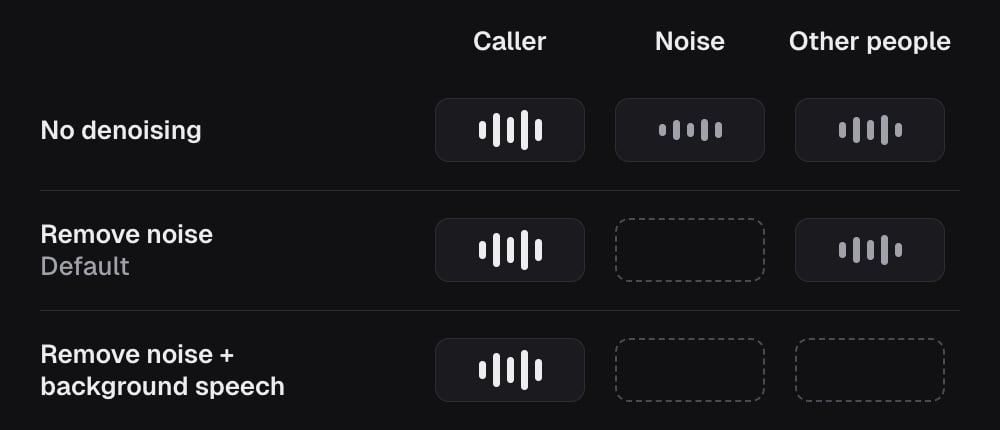
Real phone calls are noisy. Denoising mode cleans up what the agent hears before it works out what the caller said. Remove noise is the default and filters out background noise. Remove noise + background speech also drops other people talking near the caller, but can clip the caller’s own voice. No denoising passes the audio through unchanged.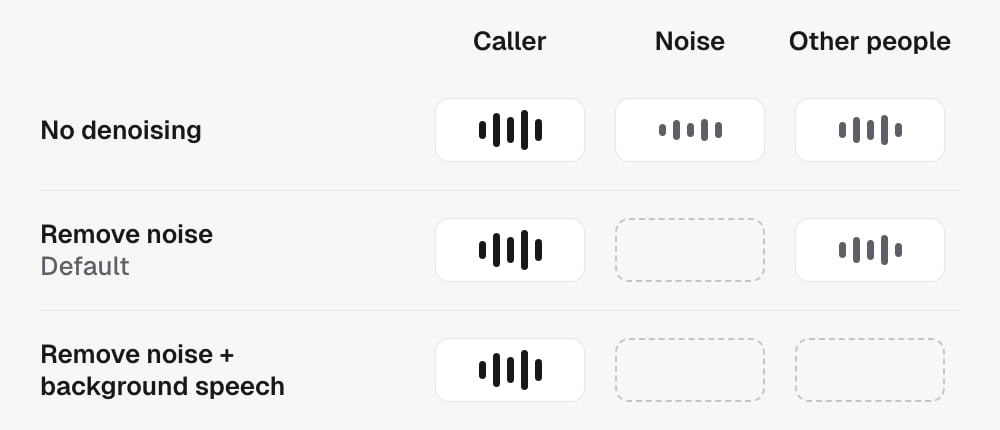
Do / Don’t
- Do listen to the agent out loud before going live. Your ear will catch things the settings page won’t.
- Do match the pace to your audience, slower for detail heavy calls.
- Don’t crank expressiveness to the top. Natural beats dramatic.
- Do keep a background sound quiet. It should be felt, not noticed.
- Don’t turn the background off to fix a robotic sound. Silence is what makes it sound robotic.
Listening, interruptions and transcription
How the agent listens, when it lets the caller cut in, and the transcription
settings behind it.
In the API
Every setting on this page is a field on the agent’sconfig, set with
Update agent.
Three more settings shape the conversation itself and live under
config.interaction:
enableBackchannel,backchannelFrequencyandbackchannelWords: the small “mm-hm” and “right” sounds the agent makes while the lead is talking, and how often.fillerWords: whether the agent uses natural fillers like “so” and “well”.responsiveness: how quickly the agent starts talking after the lead stops. Higher is snappier and interrupts more.
config.callScreening.callPurpose is the one-line reason the agent gives when a
phone’s call-screening assistant asks why it is calling.
In a split test, voice, language, interaction
and callScreening are all per-variant, so you can test any of them.