
- The campaign type decides what starts the call. There are three.
- Its capabilities decide what the agent can do once the call is live. You pick one or more.
The three campaign types
The third column is the value the API expects as
agentType. Clicking around
the dashboard, you can ignore it, the picker sends it for you. These three are
the values to send. The older spellings outreach and appointment are
still accepted and mean outbound and confirmation.
The capabilities
A capability is one thing the agent can do on a call. Adding one is not just a prompt line: it installs the tool the agent calls, the fields it fills in afterwards, the route your campaign takes when it happens, and the setting it needs before it can run. All at once, or not at all.
Outbound and Inbound need at least one capability to start. Confirmation always
starts with Appointment Booking, because rescheduling is the job.
Stack them freely. An Outbound agent with Live Transfer and Add Tag can
do both on the same call.
Capabilities decide which outcomes exist
This is the part worth internalising. A call can only end in an outcome its capabilities allow:- Transfer (
TRANSFER) is only a possible outcome when Live Transfer is installed. - Booked (
SUCCESS) and Rescheduled (RESCHEDULE) are only possible when Appointment Booking is installed. - Tag applied (
TAG_APPLIED) is only possible when Add Tag is installed.
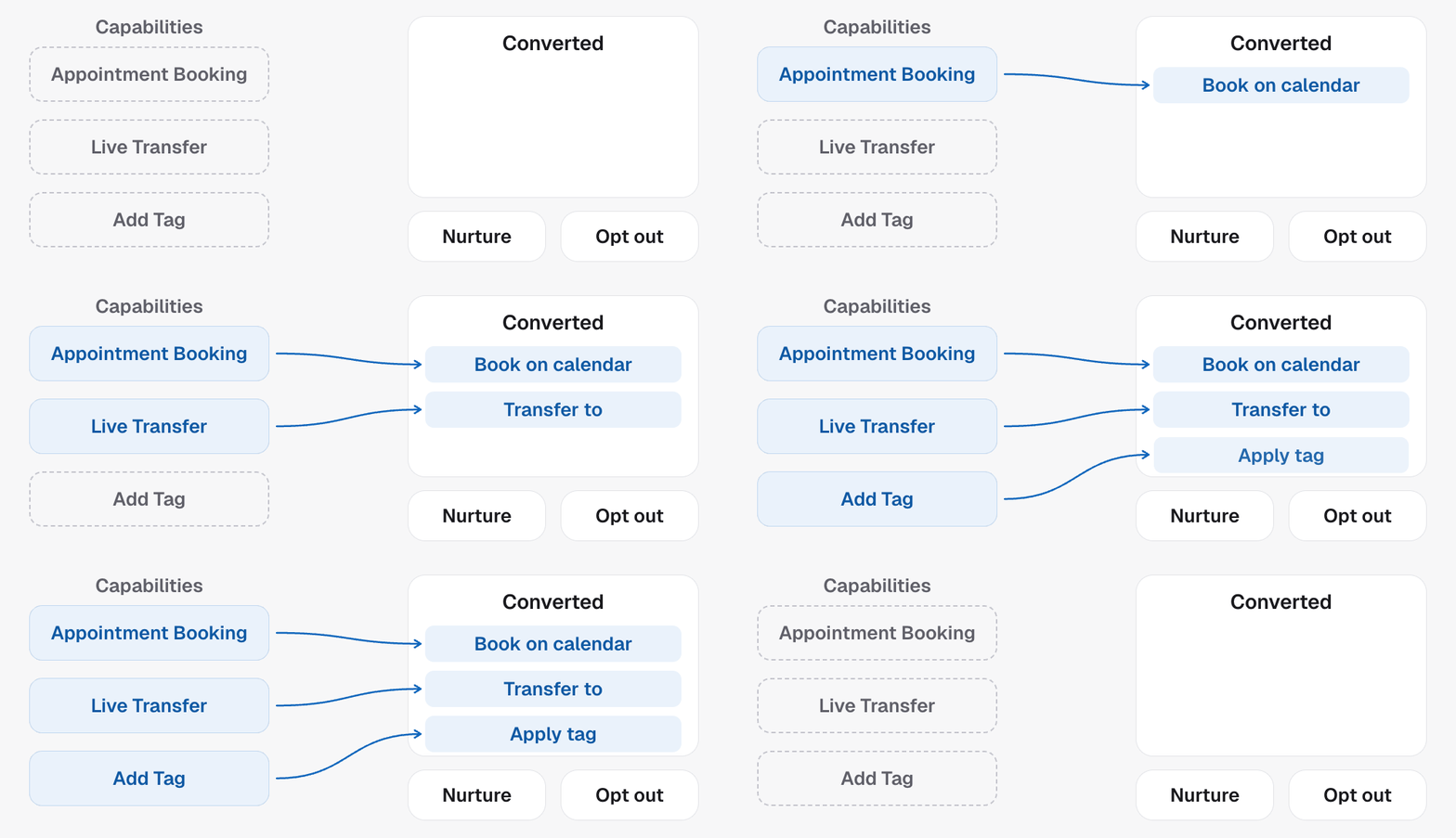
Capabilities are things the agent can do, not a ranked fallback chain. The
agent does not try one and fall back to the next in a fixed order; it uses
whichever fits the moment, guided by your prompt. If you want transfer
attempted before booking, say so in the prompt.
Creating one through the API
Send the type and the capabilities together to Create agent:agentType set on Create agent, and the
capabilities each can start with are the capabilityIds on this page. Outbound
and Inbound each accept a set; Confirmation resolves to one fixed template.
Once the agent exists, its campaign carries the installed set as
capabilities, so you can tell what an agent can do without inferring it from
a template id.
If you integrated before this
Older integrations sent a single combined id, likelive_transfer_and_tag, as
system. Those seven ids were shorthand for the type-and-capability pairs that
happened to be common:
Sending
system on its own still works, so nothing you built has broken. It is
the narrower way to ask, though: those seven are the only combinations it can
express, while type-plus-capabilities covers every combination. Send agentType
and capabilityIds for anything new.
You may still see one of the seven ids on a campaign, in the
system field.
It records which template the agent was built from, not what it can do. On an
agent created with several capabilities it only names the first one, so read
the capability list, not this.Do / Don’t
- Do pick the type by what triggers the call, not by what you want out of it.
- Do add a capability when you genuinely want the agent doing that thing. Every one you add is another thing the agent can reach for mid call.
- Don’t stack capabilities that pull the call in different directions. A caller can feel an agent chasing three things at once.
- Don’t rely on
systemto tell you what an agent does. Read its capabilities.
In the API
- Create agent
- Get agent shows
capabilitiesandsystemon the campaign - The outcome constants each capability unlocks are listed in What your agent records
- Every field above is defined in the Glossary