
Workflows and tools
Every workflow is one tool for the agent. Its name is the tool’s name, so renaming a workflow renames the tool. Its description is when the agent should use it. There are no special workflows: every node can be used in any workflow, and a template is only a starting point.
Every new agent starts with Schedule a callback and Stop contact, so no
agent is created without a way to call a lead back or to stop contacting one.
They are ordinary workflows afterwards: rename, change or remove them. The tools
that stay tools are
Chat (text the lead, on Brain’s Channels card), Earlier conversations (look back at past
calls and texts), Business playbooks, Resume call after drop and
End the current call.
How a workflow is built
A workflow runs its steps in order. A node with outputs ends its list: what happens next goes on one of its outputs.- Collect information is the only way the agent supplies inputs. Each item is text, a number, yes or no, or one of a list of choices, and becomes something the agent must provide. A value already on the lead is reused unless Reconfirm is on, and the agent asks the caller for what is missing. An item can save its answer to a contact field. A time or an address is collected as text (or as several items), not as its own type.
- Conditions choose a path from collected answers and what your CRM holds about the lead. A missing or unreadable value never matches, so it takes Otherwise.
- Actions: add or remove a tag, move a stage, add a note, set a field, send a text or email, send a webhook, notify a teammate, arrange an AI call, cancel scheduled outreach, put the lead on DND.
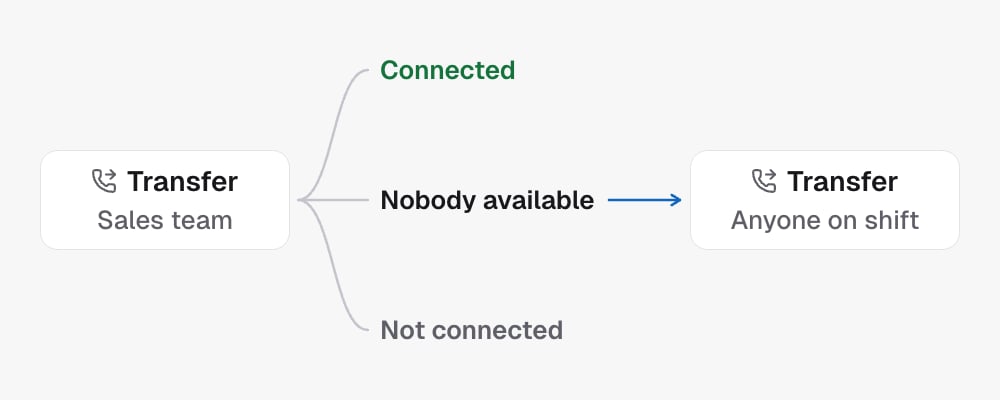
- Transfer: one destination per node (a number, a team, everyone on shift, one rep, the rep assigned to the lead, or the campaign’s transfer settings in Settings), with three outputs: Connected, Nobody available and Not connected.
- Find slots offers times from one calendar, or from routing rules over collected answers: the first rule that matches picks the calendar. There is no default calendar, so add a last rule for everyone else. Book appointment books the time chosen there.
- Check tag: one tag, two outputs, Yes and No. The agent learns the answer from the result.
- Check zip code compares the zip code a contact field holds with your list: In area, Out of area, or Missing when the field is empty.
- Webhook with response: calls your HTTPS endpoint, maps fields from its
answer, and continues on Success or Failed. A condition can read
response.<field>and Steer the agent can say{{response.<field>}}. - Steer the agent: guidance the agent receives with the result, so it knows what happened and what to do next. It does not run another tool.
Tags
The agent never chooses a tag. A tag is chosen in its node, and each tag the agent should check or add is its own workflow with its own description, for example The caller says they already have an account for a workflow that checksexisting-customer. Both templates are ordinary workflows afterwards:
rename them, extend them, or add a Check tag or Add tag node to any other
workflow.
What a webhook sends
Every Webhook with response request carries the call’s context, then the fields you add. POST sends JSON; GET sends the same values as query parameters named by their path (fields.plan, contact.firstName).
null. Each field you add has a name and one source:
- Fixed text.
- Contact field: a standard field or one of your custom fields.
- Call detail: the call ID, direction, from number, to number or start time.
- Collected answer: an item a Collect information node earlier in the workflow gathers.
Authorization or X-API-Key. An
authentication header is always a secret: it is stored encrypted, sent only
with the request, and afterwards shown only as saved, with Replace and
Remove. Nobody reads it back: not you, the API, Build with AI or the
revision history. Host, Content-Length, Content-Type, cookies and connection
headers cannot be set. Browser and phone tests never send webhooks.
A saved secret belongs to the webhook it was typed into and the address that
webhook sends to. Point the webhook at another host, or copy it into another
step, and the value must be entered again: a saved secret is never sent
anywhere it was not typed for.
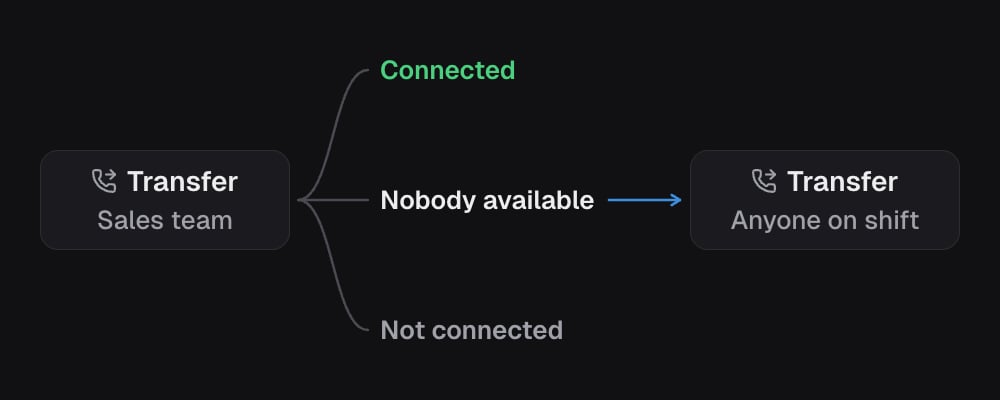
To route transfers, draw it: a condition leading to one Transfer node or
another. To try someone else when nobody picks up, hang a second Transfer node
off Nobody available.
What runs while the caller waits
A workflow runs while a live call is waiting, so it is split in two:- Conditions, checks, the transfer, Webhook with response, bookings and Steer the agent finish before the agent gets its answer. Tags and field changes update the call’s copy of the lead at once and are saved to the CRM straight after.
- Notes, texts, emails, notifications, Send webhook and Move stage run straight after the agent has its answer, so they add no silence.
Boundaries
- A call makes one transfer attempt; a fallback transfer goes only on Nobody available.
- After Connected the agent has left the call. That output takes actions and conditions, never Steer the agent, another transfer or DND.
- Put on DND ends the journey, so it is the last step on its path.
- A sub-account on the built in CRM has no tags, so tag nodes are not offered there, and a save that holds one is refused.
- Saving checks what a new or changed step names in your sub-account: the
custom fields it writes (Set field, a Collect information item saved to
a field) and reads (a Condition case, Check zip code, a webhook field
from a contact field), the pipeline stage of Move stage, and the
calendars of Find slots and Cancel appointment, which must be active.
A
{{contact.custom.…}}inside text is not checked: an unknown one is left empty. - Your own endpoint is a workflow with a Webhook with response node.
- Up to five levels of outputs and sixty steps per workflow, twenty workflows per agent, and twenty fields per webhook.
In the API
The workflows live in the agent’sbrain.capabilityConfig.workflows, keyed by
a workflow id (wf_ and eight lowercase letters or digits). Each holds id,
name, description and steps. A secret header reads back as
{"secret": {"id": "…"}}; send that back unchanged at the same step to keep
it, or {"secret": {"value": "…"}} to set a new one. Workflows can also be
read and written one at a time with
List TFU Live workflows and
its neighbours. See the workflows contract for
every shape, rule and error, and Build a TFU Live agent
for reading and saving an agent.
Related
- TFU Live agents
- The brain
- The voice
- In-call capabilities for how the same idea works on an ordinary agent.