
The three names for one project
Every project carries three identifiers, and they are not interchangeable.
Build on
locationId. When an endpoint accepts both locationId and
projectName, it applies the id and ignores the name.
Create without a CRM
Use List projects to discover a suitable workspace first. If none exists, Create native sub-account acceptsbusinessName and an IANA timezone. It requires projects:write,
enforces your plan limit, and assigns the workspace to your agency. Staff also
provide agencyTag. Use the returned data.locationId when creating the agent.
If creation returns a message saying the workspace is inactive, resolve the plan
limit before using it. If the response is lost, list projects before retrying.
Native creation does not create an agent or activate a campaign. You can then
create a TFU Live agent in that workspace.
What a project holds
A project record fromGET /api/v2/projects/{id} carries the settings that
apply to every campaign inside it:
statusandactive, described below, andplanLocked, described under the Free plan’s sub-account limit.installed: whether the GoHighLevel integration is set up. Alwaystrueon a sub-account that keeps its contacts here, which has nothing to install. A project can be installed and stilldisconnectedwhen its credential has stopped working. That needs a reconnect, not a reinstall.timezone: the sub-account’s timezone. Calling windows use it unless a campaign says otherwise.multipleTimezoneCheck: the project-level default for contact timezone. A campaign can override it.callingWindowOverride: a project-wide calling window that campaigns inherit.callbacksHandledByHuman: whether callback requests go to your team rather than back to the agent. See Speed to lead and power dialer.knowledgeBase: plain text about the business that every agent in the project can draw on, such as opening hours or service areas. See Business knowledge.campaigns[]: every campaign in the project, with its own settings. See What a campaign is.ghl: live location data read from GoHighLevel, such as the business address and phone. It is alwaysnullon a sub-account that keeps its contacts here, and on a GoHighLevel onenullmeans the connection could not be used. Readstatusrather than interpreting this yourself.crm: the system keeping the contacts.ghlmeans GoHighLevel;nativemeans Team Follow Up. Use the project’s supported actions rather than assuming every CRM supports tags or the same messaging workflows. See GoHighLevel resources.
GET /api/v2/projects is the one list. Filter with hasCampaigns,
locationId, campaignId, agentId, active or search for pickers and
lookups; every row is the full record.
Calendars, tags, pipelines and custom fields differ between projects. A calendar
in one sub-account is not automatically available in another. See
CRM resources.
Project states
The dashboard shows these as Live, Calls Stopped and Disconnected,
and Stop all calls parks a sub-account.
Park a project by setting
active: false with PUT /api/v2/projects/{id}.
On a plan with a sub-account limit, parking frees its slot. DELETE /api/v2/projects/{id} goes further: it
disconnects the sub-account and hides the project from your workspace, and it
needs the separate projects:delete scope. Pausing one campaign is a narrower
change than parking or disconnecting its project; choose the scope that matches
what you want to stop.
The Free plan’s sub-account limit
On the Free plan, including after your subscription ends, your agency can use 3 sub-accounts: the 3 oldest that are active. Every other active sub-account is plan-locked, and itsplanLocked field is true:
- The dashboard shows it greyed out with Upgrade to use this sub-account, and it cannot be opened.
- Its campaigns place no new calls. A call already in progress finishes, and calls into the sub-account are answered as before.
- Every change to it or its campaigns is refused with 403
PLAN_SUBACCOUNT_LIMIT, except switching it off withactive: false, so you can still deactivate and delete one you no longer need.
SubAccountCapReached.
Agencies
Each project carries itsagencyName; there is no separate agencies list.
An agency admin is always pinned to
their own agency, so the agencyName filter on GET /api/v2/projects narrows
within it and never widens beyond it.
An API key belongs to an agency. Everything it reads or writes is scoped to
that agency’s projects. See Authentication.
Templates and readiness
The legacy campaign templates, such asappointment_booking and
inbound_receptionist, are not published. A campaign’s agentType and
capabilities say what it can do; see
Campaign types and capabilities.
There is no validation call either. Read the campaign back with
Get campaign and work through the
go live checklist; the platform tells you when a
calendar, destination or cadence is missing. A ready campaign still needs to
be activated separately; checking readiness does not place a call.
For a master campaign, Project Manager and bindings
explains which settings belong to each business and what can prevent a child
campaign from going live.
Boundaries
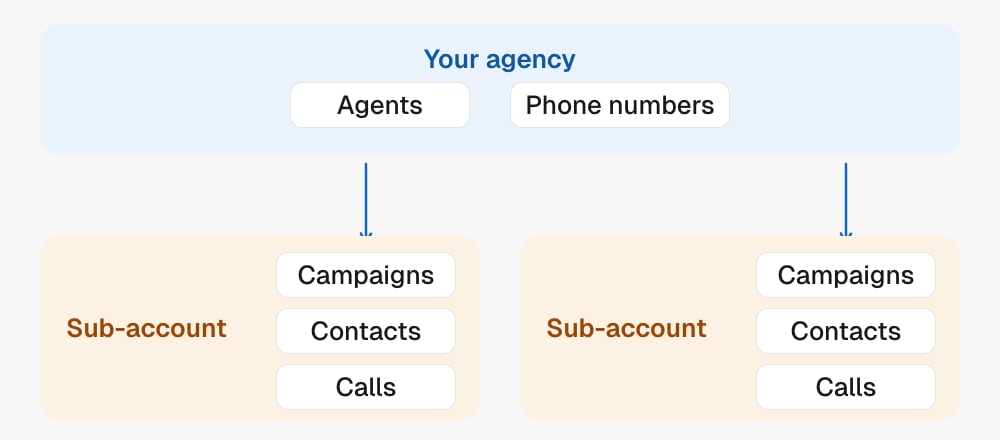
- One project is one sub-account, with contacts in its configured CRM or in Team Follow Up.
- On the Free plan only the 3 oldest active projects can be used;
planLockedsays which ones cannot. - A campaign belongs to exactly one project, and its
locationIdis that project’s. - The
agentTypeon a project’s campaigns is the legacy template id, not the three-value type the Agents module uses. See Campaign types and capabilities. - Names are labels. Ids are identity.
In the API
- List projects and Get project
- Update project to park, rename or set the knowledge base
- Delete project to disconnect and hide
agencyNameon each project from List projects is the agency listing; there is no separate agencies call- The legacy campaign templates and the pre-go-live validation are not published; use the go live checklist
- Every field above is defined in the Glossary
Related
- Master Agent runs one campaign across many projects.
- Quickstart creates your first agent inside a project.