
A new way to think about a voice agent
For years a voice agent was one long script. Every rule and objection packed into a single wall of text, with the agent trying to hold all of it at once. It works until it doesn’t. The more you add, the more each instruction gets buried, and the more the agent drifts. Skills flip that. The agent carries a set of small, focused plays and reaches for the right one exactly when the moment comes up. It’s closer to how a good rep actually works: they don’t recite everything they know on every call, they pull the right move when the call calls for it.Why it makes calls more reliable
- Progressive disclosure. The agent sees the triggers, not the full text. It pulls one skill’s instructions the instant that moment lands and ignores the rest. More skills makes it sharper, not foggier.
- Fewer hallucinations. Each moment gets its own tight brief instead of being lost in a mega prompt, so there’s far less room to improvise.
- More deterministic. For the things that must be exactly right, do we cover this ZIP, transfer here, tag this lead, a tool runs real code and returns a fact instead of a guess.
- Always improvable. Every skill is a small thing you can watch, edit, and sharpen on its own. Your agent keeps getting more reliable because you tune specific plays, not a wall of text.
Two kinds of ability
Skills you write
Rules in plain English: when this comes up, do that. No code. Your judgment,
taught to the agent.
Tools we ship
Built abilities you add and configure, deterministic where it counts. A tool
checks a ZIP, transfers a call, tags a lead. You don’t build tools; we maintain
them so they work every call.
During the call, or after it?
This is the first question to settle, because it decides whether you want a skill at all. A skill runs during the call, while the caller is on the line. A follow-up action runs after the call ends, off the outcome the agent recorded. They happen at different moments, and each one is impossible in the other’s.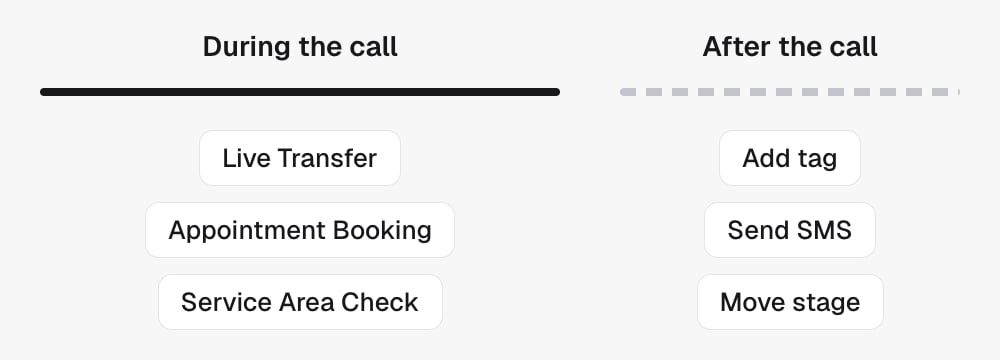
- Transferring to a person. The whole point is connecting someone now.
- Booking, when the caller has to hear the time and agree to it.
- Anything the agent needs an answer to before it knows what to say next: a service-area check, a tag lookup that changes the conversation.
- A label whose only job is to fire something the caller is being told about right now. “I’m texting you that link” is real work happening on the call, and they’ll notice if it doesn’t arrive.
Why after the call wins whenever it’s allowed. It runs every single time
that outcome happens, instead of only when the agent decides to reach for a
tool. It runs off what actually happened on the whole call, not a guess made
halfway through. It can branch on a value. It doesn’t spend the one slot each
ability gets. It costs the call no waiting. And you can change it later without
touching the script.
Any ability installs on any campaign
There is no compatibility rule between abilities and campaign types. A campaign carries a set of abilities and installing one adds to that set, so an appointment booking agent can absolutely also transfer to a human. Nothing needs a separate campaign for that. What is fixed is the campaign’s trigger: what starts it, a tag landing or an inbound call or a booked appointment. That is chosen once, at creation. “Also transfer to a human” is an install. “Also answer inbound calls” is a different campaign.
So the install is only half the job. Whatever it newly requires has to be set in
the same sitting, or the agent has an ability it cannot use and the campaign
cannot go live.
For a complete collection change, read Editing several skills.
On an agent tagged TFU Live the same idea is arranged differently: abilities
are equipped on a canvas, and anything that must happen every time one succeeds
is a step in that workflow rather than a line in the script. See
Capabilities and workflows.
In the API
A skill is one record on the agent:
The set is versioned. Reads return
version; send it back as expectedVersion
on a write, and a stale one gets 409. See Conventions.
Three more reads help you manage them:
- The library lists everything this agent could carry, each with
kind(skillortool), astatusofavailable,added_as_skillorinstalled_tool,canAdd, and thefieldsyou would configure. - The digest is one line per skill: what it is for and whether it is on.
- The tools inventory lists the tools installed on the agent with a
freshnessofliveorcached, and aneditableDescriptionyou can change to adjust when the agent reaches for that tool.
- List agent skills,
with
view=summaryfor the digest - List available tools
- Create an agent skill, Update one agent skill and Delete one agent skill
- Get agent with
view=toolsfor the installed tools, and Update a tool description - There is no bulk replacement; change one skill at a time so the rest of the set is never erased
- Every field above is defined in the Glossary