
Prerequisites
- An API key from an agency admin with the
billing:writescope. To charge the client’s card in the same step, the key also needsbilling:charge. - Your agency is on the Business plan (or is a managed agency), the plans that
include sub-account wallets and client rebilling, and Stripe Connect is
connected for your agency. Without either, every sub-account change answers
PROJECT_WALLET_NOT_AVAILABLE_ON_PLANorSTRIPE_NOT_CONNECTEDand nothing changes. - The client exists as a customer on your connected Stripe account with a working card. Create customers and add cards in the dashboard; the API never takes card details.
- The sub-account’s
locationId, from List sub-account wallets.
Step 1: Turn rebilling on
Send the client rate and the Stripe customer to Update sub-account rebilling:clientRatePerMinute and, when you include it,
sets autoRecharge, all or nothing. If any step fails, the sub-account goes
back to exactly what it had and the answer says why, for example
NO_USABLE_CARD when the customer has no working card, or
PAYMENT_METHOD_SELECTION_REQUIRED when it has several and no default.
A rate above $10 a minute needs confirmHighRate: true, so a typo cannot price a
client out by accident.
Step 2: Charge a first top-up
A freshly rebilled sub-account has an empty wallet. To turn rebilling on and charge the client in one step, use Enable rebilling with a charge instead of step 1, with anIdempotency-Key header:
PAYMENT_RECONCILIATION_REQUIRED with rebillingLeftOn: true: nothing is
rolled back, because the money may have moved.
To top up later, use Charge a sub-account.
Reuse an Idempotency-Key only to retry the same charge; a retry returns the
first answer and charges nothing.
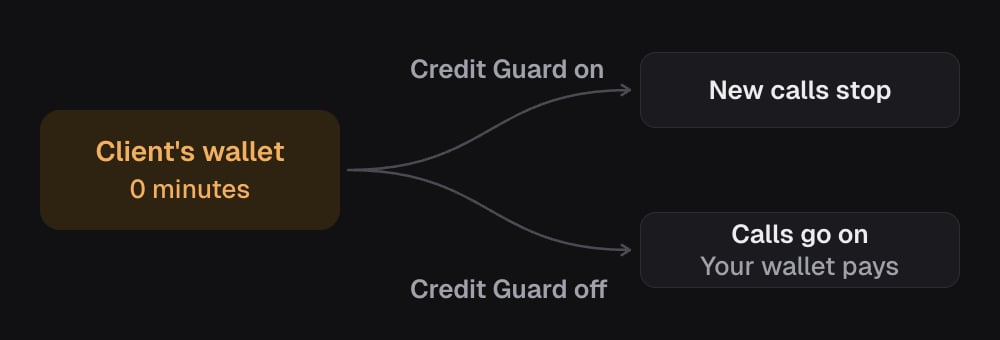
Step 3: Decide what happens when the wallet runs dry
In the sub-account’s billing settings, Credit Guard is the switch Stop calls when project wallet is empty. It is off unless you turn it on.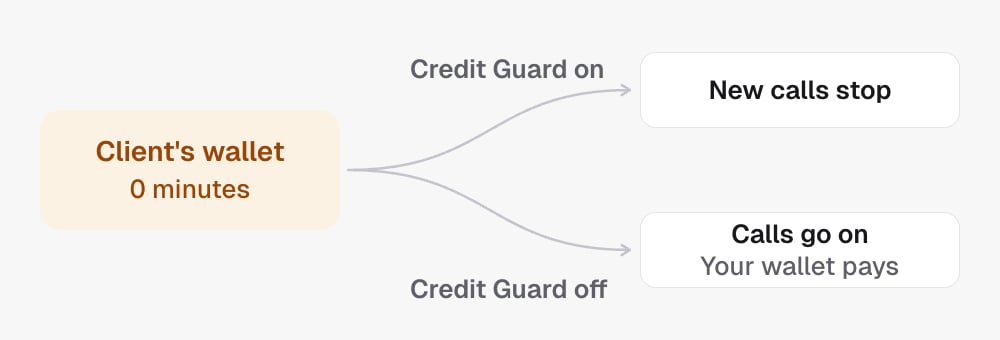
Turning rebilling off
Send{ "enabled": false } to the same rebilling operation. In one step the
sub-account’s unused minutes return to your wallet at what they cost you, its
auto-recharge goes off and its Stripe customer is unlinked. It is refused with
PENDING_CREDITS_EXIST while a client payment is waiting for credit.
Next steps
- Check the result with Get sub-account wallet.
- Share one client’s customer across sub-accounts with Link a Stripe customer.
- Read Balances, spend and sub-account wallets for what every field means.