
Understand AI interactions
Preview how the messages your chatbot delivers to leads will use your wallet.
Where you stand
GET /api/billing/summary returns one object with these sections.
Each section loads on its own. When one cannot be loaded it comes back
null
and its name appears in unavailable. So a null section named in
unavailable means “unknown right now”, and any other null means “none”.
attention lists what needs a person, most urgent first. Each item has a
code, a severity (ACTION_REQUIRED, WARNING or INFO) and a message
you can show as it is.
The transaction history
GET /api/billing/transactions is one paged list of everything that moved
your agency wallet in a window, newest first.
walletEffect is what the row did to your wallet. cashFlow is whether money
changed hands. For SUB_ACCOUNT_TOP_UP, amountUSD is what the sub-account
paid you.
CALL_USAGE counts only calls your wallet paid for: calls from sub-accounts
that do not rebill, calls you covered when a rebilled sub-account had run out of minutes with Credit Guard off,
and the part of a call that ran past a sub-account’s minutes. A call a
sub-account paid for from its own minutes is not a second charge to you, so it
is not on this list. It is in the usage figures below.
Filter with type and locationId. Filtering by sub-account leaves out
agency-level rows such as your own purchases.
Usage and cost
GET /api/billing/usage totals a window and breaks it down by sub_account
(the default) or by day.
callCostUSD and billedToClientsUSD describe the calls, so they lag the
money: a sub-account that bought minutes it has not used yet has paid you for
them already. Phone numbers and co-author usage belong to your agency, so they
appear in totals and in each day, never under a sub-account.
Sub-account wallets
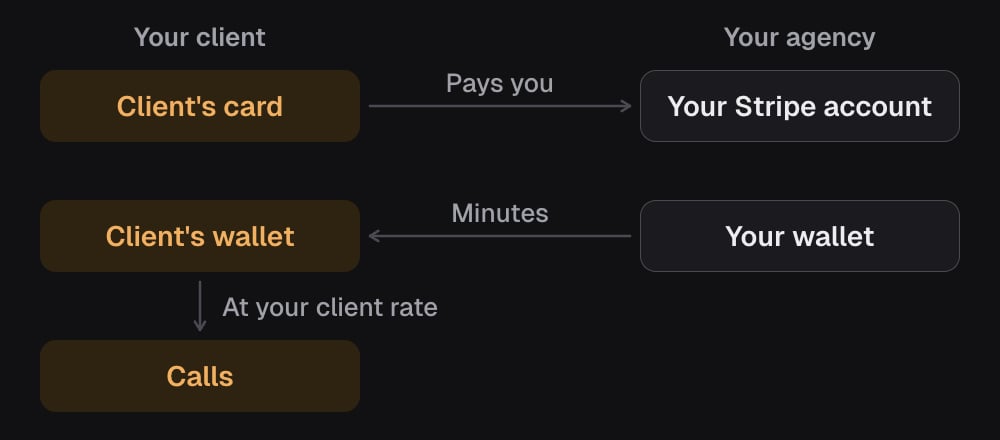
With rebilling on, the client’s card pays you, and the same value moves from your wallet into the client’s wallet as minutes. Their calls then use those minutes at your client rate.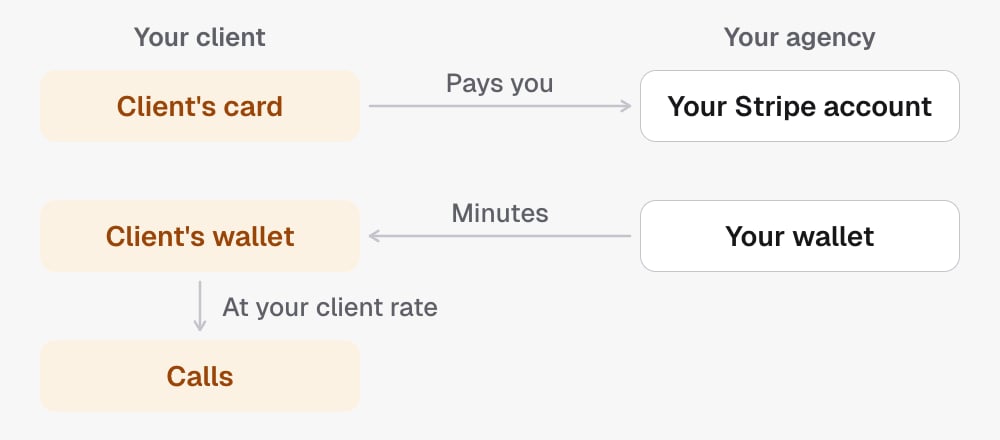
GET /api/billing/sub-accounts lists every connected sub-account. A
disconnected one is not listed.
rebilling: whether the sub-account pays for its own calls from its own wallet, and theclientRatePerMinuteyou charge it.wallet:balanceMinutes(bonus minutes and minutes set aside for calls in progress included),balanceUSD(those minutes in dollars),debtMinutes, and whether the sub-account can see its wallet (visibility,ENABLEDorDISABLED).autoRecharge: set in dollars.thresholdUSDis the dollar balance it tops up below, andrechargeAmountUSDis what each top-up charges.creditGuard: whether the sub-account stops its own calls when its wallet is empty.pendingCredits: payments the sub-account has made that are waiting for credit in your wallet.
status is ACTIVE, LOW_BALANCE, IN_DEBT or DEPLETED. A
sub-account that does not rebill is funded by your wallet, so an empty balance
there is normal. The summary only flags rebilled ones.
GET /api/billing/sub-accounts/{locationId} adds the sub-account’s
chatPrice: its own price when it has one (source SUB_ACCOUNT), otherwise
your agency’s (AGENCY) or the default (DEFAULT). It is null when the
price cannot be read right now; the rest of the answer is still complete. Only
this read carries a sub-account’s chat price; the list does not.
It also adds the creditBatches behind the balance, oldest first. A wallet
kept in credit batches lists every batch with what is left of it
(minutesRemaining, valueRemainingUSD, expiresAt). A wallet kept as one
balance lists each purchase or grant as a record, with minutesRemaining at
0 because its minutes are already in the balance, then one last row with
id balance that holds the whole balance at the current rate; on those rows
expiresAt is null. Either way, read the balance from wallet, not by
adding up the rows. A wallet kept as one balance values every minute left at
its current rate in balanceUSD; a wallet kept in batches values the paid
minutes at the rates they were bought at.
Invoices and receipts
GET /api/billing/documents lists proof of payment.
scope=platform(the default): what your agency paid the platform. AnINVOICEfor your subscription, aRECEIPTfor each wallet top-up.scope=sub_accounts: what your sub-accounts paid you. Always aRECEIPT.
type (ALL, INVOICE or RECEIPT). The platform list is capped. When truncated is true, it is not complete
history.
Changing billing
The same module changes billing. Two scopes split it by what a call does to money:billing:writechanges settings. Nothing is charged when the call returns, though switching auto-recharge on permits charges later.billing:chargecan charge a card when the call returns.billing:writedoes not include it, every such operation needs anIdempotency-Key, and none of them is available to an assistant over MCP.
Your agency’s auto-recharge mode is stored for your agency and set by our
team. It is not a setting the API changes. A top-up of your wallet that a
sub-account’s payment needs counts toward the 5 automatic charges in any 24
hours, but is never held back by them.
For a sub-account, every change needs your plan to include rebilling and Stripe
Connect to be connected, even a change that turns something off:
The walkthrough is Set up rebilling for a sub-account.
Retrying a change
Send the sameIdempotency-Key only to retry the same request.
- A request that finished answers a retry with its first answer and
idempotentReplay: true, and nothing runs or is charged again. That includes a refusal such as a declined card, so once the card is fixed, use a new key. - A
503that says nothing was changed (PAYMENT_METHOD_PROVIDER_UNAVAILABLE) does not keep the key: a retry with the same key runs the request again. 409ACCOUNT_STATE_UNAVAILABLEmeans your account’s state could not be read, so nothing that moves money runs (a purchase, a charge, switching auto-recharge or rebilling on, linking a customer): “There’s a problem with your account. Please contact support.” It does not keep the key, so the same key works once support has fixed it. Your calls and the minutes you already have keep working.- A
500from an operation that charges a card is an unknown outcome: the card may have been charged. Read the wallet back before anything else. On Buy a plan, a retry with the same key answers409IDEMPOTENCY_OUTCOME_UNKNOWN, so use a new key if you still need the purchase. On a sub-account charge, a retry with the same key runs again but does not repeat a charge that was made (IDEMPOTENT_REPLAY). - A change can also answer
503when billing information is temporarily unavailable (the codes below). It may already have been made, so read it back before retrying. IDEMPOTENCY_IN_PROGRESSmeans the first request is still running: wait, then read the result back.IDEMPOTENCY_KEY_REUSEDmeans the key was used for a different request.
Windows
dateFromUTC and dateToUTC select whole UTC days. A timestamp selects the
day it falls on. Leave both out and the history and usage endpoints read the
last 30 days. A window can cover at most 366 days. Documents are not windowed
unless you ask. See Conventions.
When billing information is unavailable
Any billing read can answer503 when billing information is temporarily
unavailable. A read changes nothing; try again shortly. error is
CANONICAL_BILLING_READ_UNAVAILABLE or CANONICAL_BILLING_CUTOVER_UNAVAILABLE.
READ_BUDGET_EXCEEDED means the answer would read more billing history than
one request may: ask for a shorter window.
Boundaries
- Adding cards, creating Stripe customers and connecting Stripe stay in the dashboard. The API never takes card details.
- Anything that charges a card needs the
billing:chargescope and anIdempotency-Key, and is not available over MCP. - Only an agency admin’s credential can read or change billing. A sub-account
user gets
403either way, because every figure here is agency-wide. - A key needs the
billing:readscope to read.billing:writecovers it.billing:chargecovers neither. - A sub-account belongs to the agency that owns it. One that is only shared with you is not in your billing.
- A
locationIdthat is not one of your connected sub-accounts returns404, whether it does not exist or belongs to someone else.
In the API
- Get billing summary
- List billing transactions
- Get billing usage
- List billing documents
- List sub-account wallets
- Get sub-account wallet
- Update sub-account rebilling
- Charge a sub-account
- Every field, one line each: Glossary
Related
- Agencies, projects and sub-accounts
- Authentication for the
billing:readscope. - Metrics and how they are calculated for call outcomes rather than cost.