
The two modes
Mode here means the window, not how you dial. Speed to lead and power dialer
live in When and how often.
Every campaign starts on Standard. Switch to AI After Hours only when a human team
is doing the calling and you want the AI to cover the off hours. The full
after-hours setup is in AI After Hours.
Standard calling window
Set the days of the week and a start and end time, like Monday to Friday, 9am to 5pm. A few things worth knowing:- Split days are fine. You can set more than one block on the same day, say to skip the lunch hour. Two blocks on the same day must not overlap.
- Windows can cross midnight. An overnight window like 10pm to 6am is allowed. It just closes the next morning.
- No window means no limit. Leave it off and the campaign can dial any hour of any day.
- Saving replaces the whole schedule. The hours you save are the hours the campaign has. Blocks you leave out are gone rather than kept alongside the new ones, so set the full week in one go rather than a day at a time.
AI After Hours
AI After Hours has one rule: the AI never calls while your human team is working. It only picks up the hours they don’t cover. You give it two things:- Your human rep schedule, the days and hours your people work, in their timezone.
- AI coverage limits, the earliest and latest the AI is ever allowed to dial, so it never calls someone at 3am.
Example: human team 8am to 5pm, AI limits 6:30am to 10pm. The AI works only the two blue gaps. Before 6:30am and after 10pm, no one calls.
What happens to a lead that arrives outside the window
This is the part that actually matters, and it is the difference between the two modes. When a fresh lead comes in outside the allowed hours, the campaign does one of two things: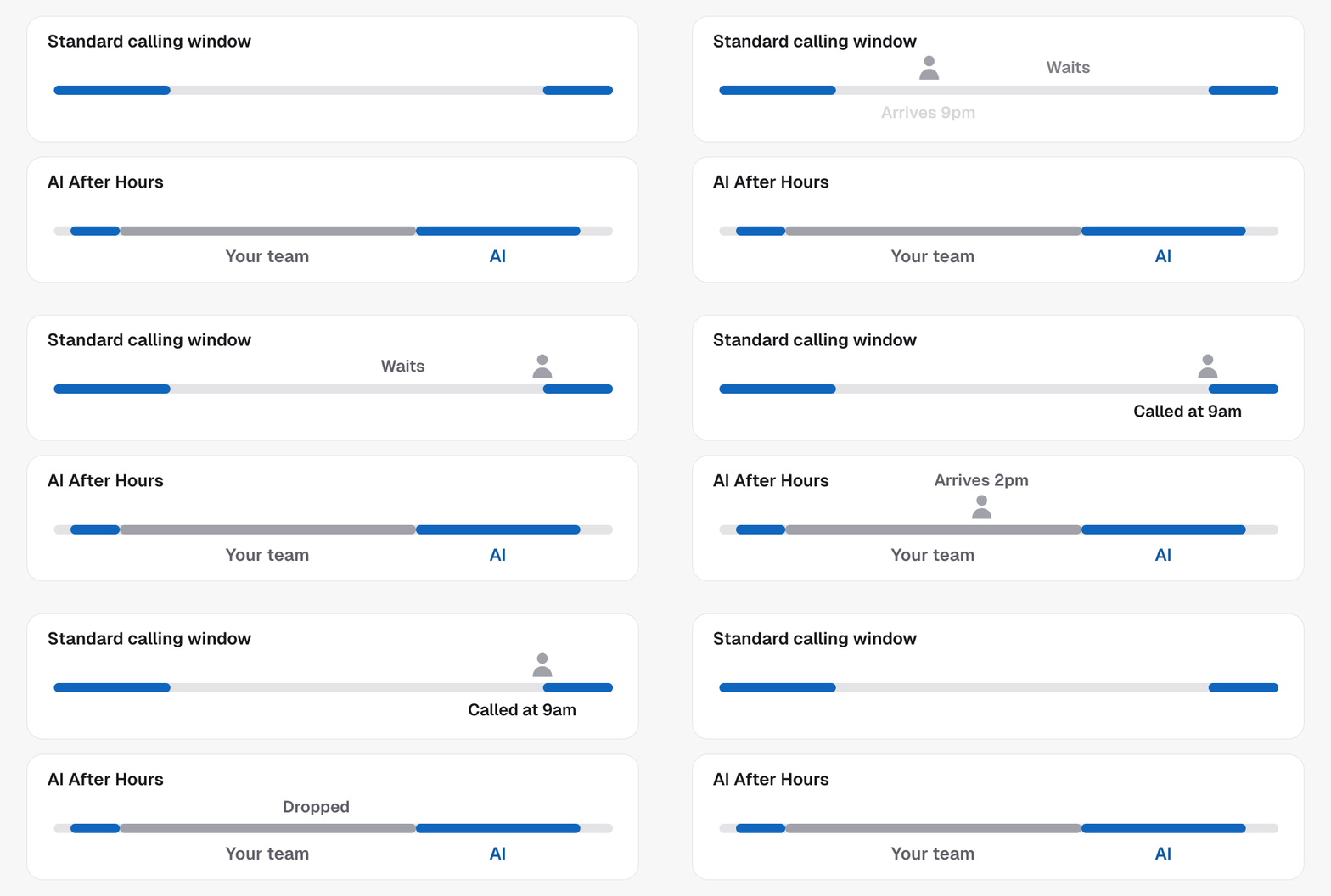
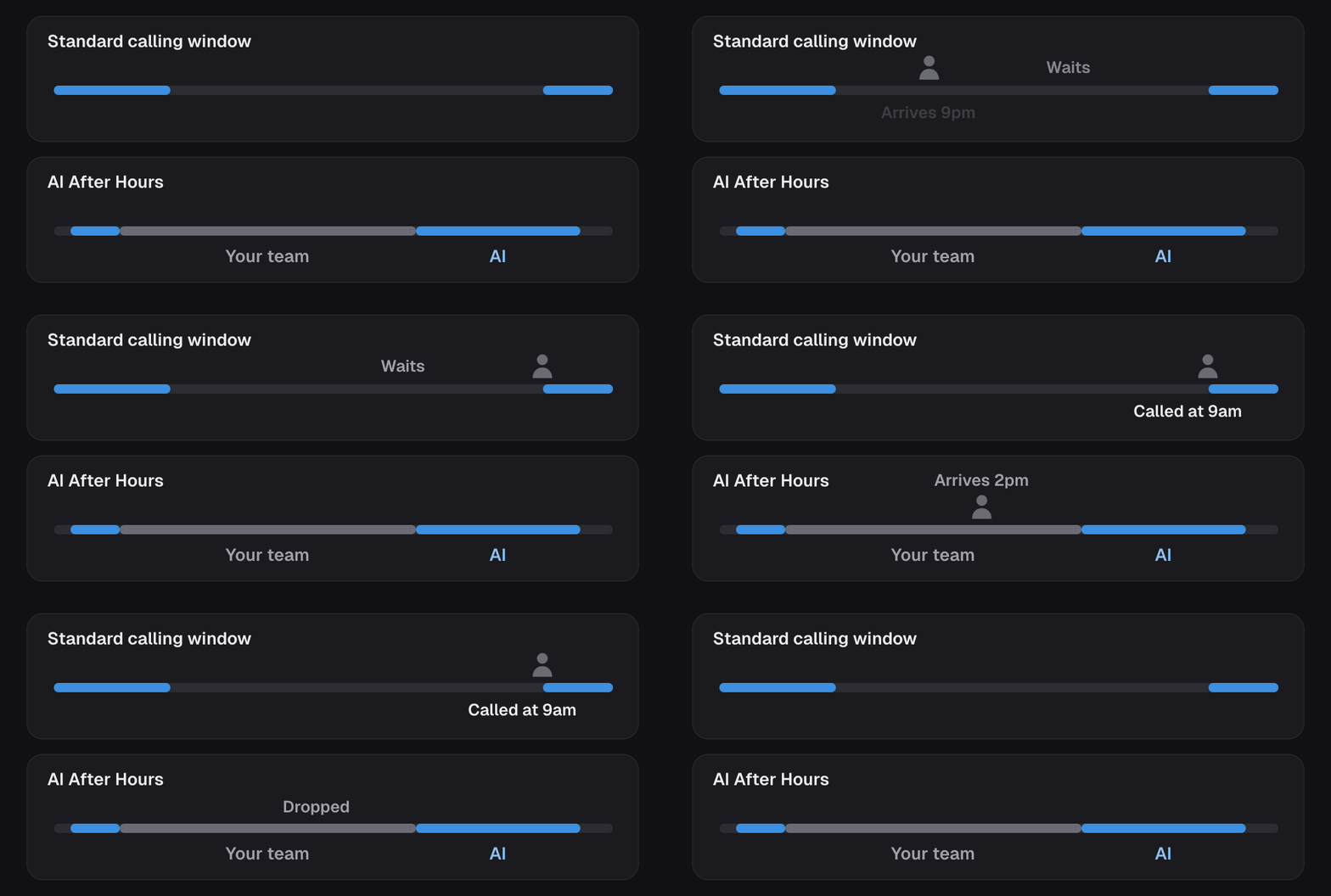
Held or dropped comes with the mode, and there is no separate switch for it:
AI After Hours drops, a standard window holds. It is set again every time the
calling window is saved.
Whose clock is the window measured in?
By default the window runs on your business timezone, so everyone is dialled on your clock. Turn on the contact timezone setting and the window instead runs on each contact’s own local time. That same setting also tells the AI agent what time it is for the lead, so it changes more than just the window.Contact timezone, in full
How the contact timezone setting works, everywhere it applies, and where the
timezone comes from.
Where it sits with the rest
The window decides when you are allowed to call. It works alongside the dispatch mode and the cadence, which decide how and how often. Before you flip a campaign live, sanity check all three. See Go live.In the API
A standard window is the campaign’scallingWindow, set with
Update campaign:
daysare ISO weekday numbers: Monday is1, Sunday is7.startandendare 24-hourHH:MM. Anendearlier thanstartis an overnight window.tzis the IANA timezone the window is written in.- Send an array of windows for split days, one object per block.
AI After Hours, with its human rep schedule and AI limits, is set up in the
dashboard. Held leads are visible through
List parked speed-to-lead leads.
Every field above is defined in the Glossary.