
Picking the voice
This is the one hard choice on the whole agent. The voice sets the things you cannot talk it out of: its basic timbre, its range, how old it sounds. You cannot write your way from one voice to another, so if a client has a strong preference, start here rather than in the writing. There are 22 voices. The button above the writing names the one in use; click it to open the picker. Each row gives the provider’s own description of the voice, the accent it carries and whether it reads as a woman or a man, and you can narrow the list by gender and accent before you listen. Picking a row saves it. Besides North American voices there are Southern U.S. (Delta, Cinder), British (Vesper), Irish (Willow, Stone), Australian (Quartz, Ripple) and Filipino (Beacon) voices, and two made for Brazilian Portuguese (Bossa, Tempo). Every voice can speak other languages; test it with the language your calls use. Listen to the sample before you choose. Marin is the voice every new agent starts with.
Every description, accent, gender and source (natural or generated) above is
the provider’s own tag for the voice. Your ears decide: the tags only tell you
where to start.
Hearing it
Samples tell you about the voice and nothing about the conversation. The Test column on the left of Configure myself, the same one every agent has, places a browser call to the agent as it is saved: its real script, its real voice, the room behind it. Actions are simulated, so no tags, texts or bookings land. When the call ends, say what was wrong there and the agent takes it as a change. It will not start while a save is still setting up, and says so, because you would be listening to the old version and concluding your change did nothing. This is different from Roleplay in Build with AI, where you play the lead and can correct the agent out loud as it goes. Here nobody is taking notes: it is a call, and the way out is ending it.What you write here
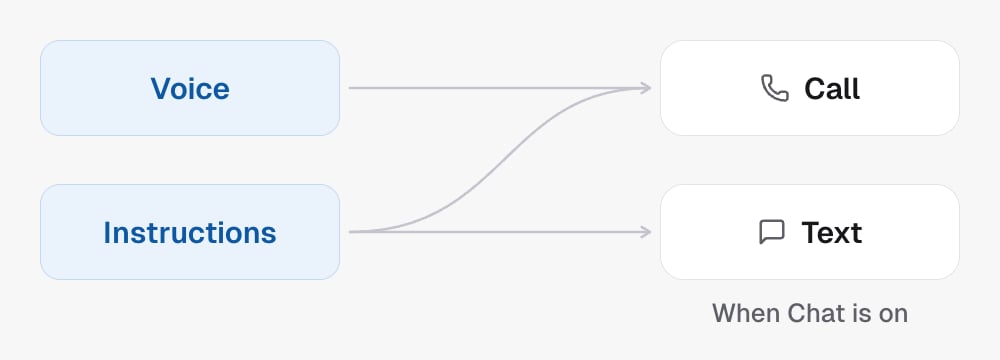
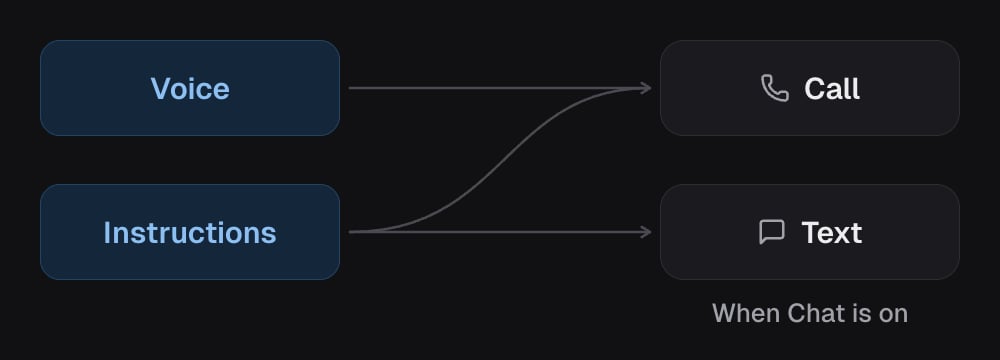
A short piece, usually five or six lines, covering only what needs audio to exist:- Accent. The accent comes with the voice: pick a voice that already has the one you want. Writing a different accent here does not change it.
- Language. Ask it to speak Spanish and it speaks Spanish.
- Pace and energy. Brisk, relaxed, low key. There is no speed setting on this runtime: the pace is what you write here.
- Interruptions. What it does when someone talks over it. Stopping at once and answering what was actually said is usually right.
- Silence. Whether it fills a pause or lets it sit.
- Listening. The small sounds a person makes while someone runs on.
- Imperfection. Whether a natural stumble is fine, and where it never is: a name, a time, a price, a confirmation.
{{first_name}} and the
other contact fields, custom fields and custom values, the same list an
ordinary agent’s prompt offers. They are filled from the CRM contact on every
call and every text. A field the contact does not have comes out blank, never
as braces.
Background sound
By default the line is silent. The Background button above the writing puts a room behind the agent, mixed under its voice on every call: Office, or People nearby. Volume runs from 0 to 100; around 40 is a room someone notices only if they listen for it, and the Listen button plays it without a call. Unlike the voice, the room does not wait for the next call. Move the slider during a browser call and you hear it change under the voice you are listening to. It is easy to overdo: if it is distracting on a quiet listen, it is worse on a phone speaker in a supermarket. When in doubt, leave it off.Written, not dialled
Worth being straight about the trade. On an ordinary agent, speaking speed is a number, and the same number produces the same result on the thousandth call. Here it is a sentence, and a sentence persuades rather than guarantees. Ask for slower and you get slower on most calls, a little less so late in a long one, and slightly differently tomorrow. In exchange you can ask for things no slider ever offered, like “let them finish even when you already know the answer”, so the trade is usually worth taking. Two things follow from it. Pick the voice closest to what you want before you start writing: its accent is its own, and no sentence here changes it. And keep anything that must be exact, a price, a time, a spelling, in the brain rather than trusting it to delivery.There is no speaking speed, expressiveness or noise handling setting here.
Those are sentences on this runtime, written in the delivery text above.
The orb colour
The orb is the round shape that stands for the agent on your screens. Its colours are cosmetic: they change how the agent looks to you and your team, never what it says, how it sounds or what it does on a call. Thestyle
field names one of four kinds.
Every preset is a pair: a main colour for the orb and a glow colour around it.
Each pair comes from a published palette: Figma’s
100 Color Combinations,
Figma’s color palette library or the
presets of Paper Shaders.
The main colour is the palette’s first real colour and the glow the next of its
colours that differs from it, exactly as the palette gives them; the Source
column says which of the palette’s colours they are.
Changing the colour saves no new version of the agent and adds nothing to its
change history, so there is nothing to review and nothing to set up again. You
can change it while the agent is live.
In the API
Get TFU Live agent returns all
of them, and
orb is {"style": "default"} for an agent that never chose.
Update TFU Live agent saves
the voice with the rest of the agent.
Set TFU Live agent orb colour
changes the orb on its own, with no ifVersion; anything but one of the four
shapes is refused with invalid_agent. See the Agent glossary.
Related
- TFU Live agents
- The brain
- How your agent sounds, the equivalent for an ordinary agent, where these are settings instead of sentences.