
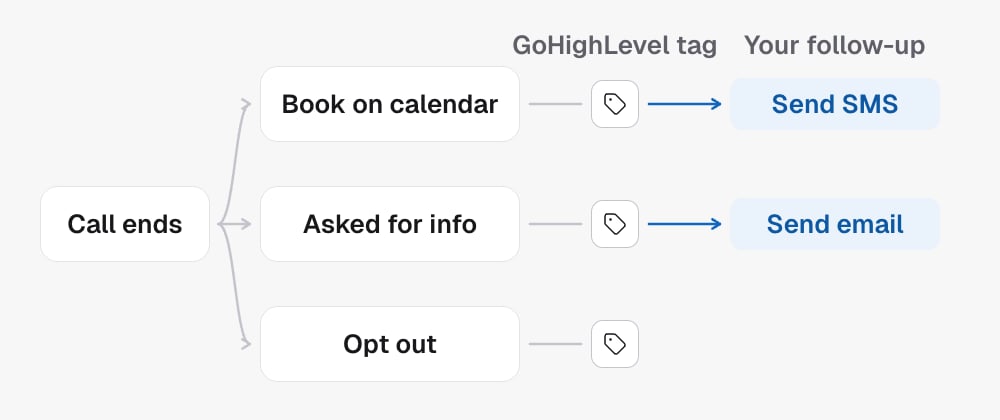
Outcomes are the entry points
The workflow is a graph with one root per outcome. The keys underdispositionEntries are the outcome constants:
An outcome with no entry does nothing beyond the automatic tag. The outcomes a
campaign can actually produce depend on its capabilities. See
What your agent records.
Nodes and edges
nodes is an object keyed by node id. Each node has a type and its own
settings. edges[] connect them with source, target and, on branching
nodes, a sourceHandle naming which exit the edge leaves from.
add-tag, remove-tag, move-stage, send-sms, send-email and add-note
need the sub-account to use GoHighLevel. set-field, send-webhook, if and
switch work either way, so a sub-account that keeps its contacts here still
branches, sets fields and sends webhooks.
Conditions on if and switch compare an AI-generated field
or a contact field with an operator: is_true, is_false, is_set,
is_empty, equals, not_equals, contains, starts_with, in, gt,
gte, lt, lte.
Outcome webhooks
Asend-webhook node posts the call to your receiver when its outcome fires.
Put one on the SUCCESS branch and your system hears about every booking this
campaign makes, and nothing else. Behind an if or switch, it fires only for
the calls that match.
urlis your public HTTPS receiver.localhostand documentation domains such asexample.comare refused when you save, and private or internal addresses are refused at delivery.- The body is the same
call_endedevent a sub-account subscription receives: the contact, the call with itsdisposition, summary, transcript and recording, the campaign, the outcome and the post-call fields. It adds anodeobject with the step’sidandlabel, so you can tell which step sent it. - Deliveries are signed with the Standard Webhooks scheme and retried on
failure. A retry keeps its
webhook-idheader, so deduplicate on it. - One signing key covers every Send webhook step in a sub-account, in flows and cadences alike. Open any of their deliveries in Settings → Webhooks to show it.
- To hear about every call rather than one outcome, subscribe the sub-account in Settings → Webhooks instead.
api-event), which fires on a
schedule with a static payload. See
Send webhooks from native sub-accounts.
Campaign-wide settings
campaignConfig on the same document holds settings that shape every branch:
callbackMode:ailets the agent place callbacks,humanroutes them to your team, withhumanCallbackCalendarIdnaming where to book them.aiNotesandnoteLanguage: whether the agent writes a call note and in which language.convertedTag: the tag that marks a lead as converted.
Saving without breaking a live campaign
The workflow runs on real calls while you edit it, so the write endpoints are built to fail loudly rather than lose a branch.- Every read returns
version. Send it back asexpectedVersionon a write. If someone saved in between, you get409and reload. - The replace endpoint swaps the whole graph. If the new graph drops nodes,
you must send
allowRemovals: true, and a400lists what would go. - The update endpoint merges. It changes settings and the contents of nodes that already exist. It never creates a node.
- The add actions endpoint appends nodes to one outcome’s branch in a single step, so a partially applied chain cannot exist.
- The remove node endpoint deletes one node and its edges.
Advisories
Reads returnadvisories[], checks that do not block saving but tell you
where the graph is weak:
Get the campaign workflow
with
view=summary gives the same graph as one line per outcome, which is the easiest
way to review what a campaign will do.
Boundaries
- One workflow per campaign. Campaigns on the same agent share the agent but not the graph.
- Branches run after the call. They cannot change what the agent says.
- Automatic tags are applied whether or not a workflow exists.
- A
409means reload, do not retry blindly.
In the API
- Get the campaign workflow
- Replace the entire workflow and Update settings or node contents
- Add actions to an outcome and Remove a workflow node
- Get the campaign workflow
with
view=summaryfor the per-outcome digest - Every field above is defined in the Glossary
Related
- What your agent records defines the outcomes and fields the conditions read.
- GoHighLevel resources is where you look up the tag, calendar, field and stage ids these nodes need.