
callCount of 0 is an ordinary contact and not a missing one.
The contact record is where you answer “how many times did we try, what
happened, and when do we try again?” It is also where you say “never call this
person”.
Where contacts live depends on the sub-account. One with a CRM connected keeps
its contacts there, and the platform keeps the calling history against each CRM
contact. A sub-account with no CRM keeps its contacts on the platform: add them
in the dashboard, import a CSV, post them with your API key, or point a form at
the sub-account’s lead link. See Adding contacts by API,
and Contacts without a CRM for managing them
afterwards: custom fields, do-not-call, deletion and the lead link.
What one contact holds
GET /api/contacts returns one row per unique contact.
How old a lead was when it arrived
A lead is usually created in the CRM and sent to the platform seconds later. A lead from an old list is different: it was created months ago and only sent now. The gap betweenleadGeneratedAtInCrm and leadReceivedByTfuAi tells the two apart.
leadGeneratedAtInCrmPrecisionistimewhen the CRM sent the exact moment, anddaywhen it sent only the date. Adayvalue reads as midnight UTC, so measure gaps under a day only when it istime.leadReceivedByTfuAiis null for leads received before it was recorded. For those,dateAddedgives the day only.leadGeneratedAtInCrmis null when the CRM sent no creation date.
GET /api/contacts/{phoneNumber}/calls returns everything the platform has
done with one person: their calls and a dispositionSummary counting how the
calls ended.
Outcome types on a contact
A contact’sdisposition.type and the disposition filter use these values:
These are the contact-level names. The per-call outcome constants that
workflows route on, such as
SUCCESS and KILL_SWITCH, are listed in
What your agent records.
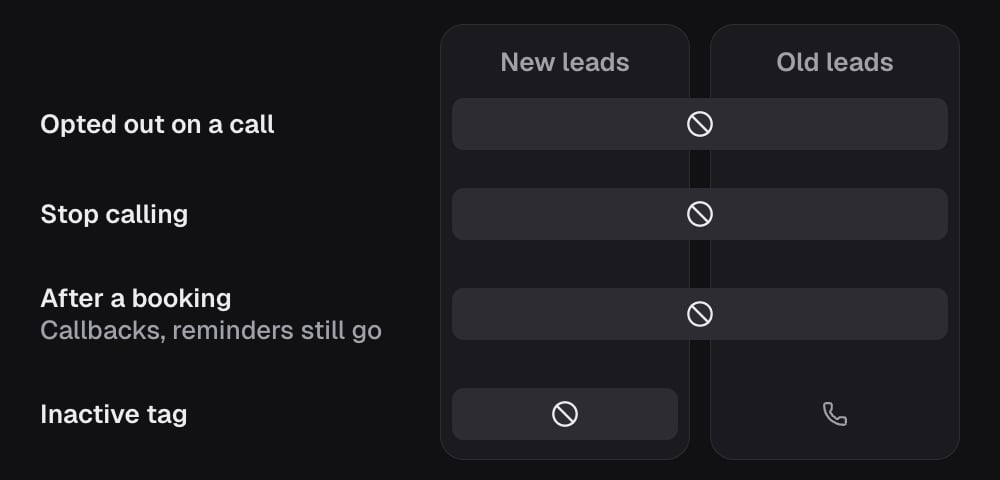
Five ways to stop calling someone
They look similar and they are not. Pick the one that matches who decided and how wide it reaches.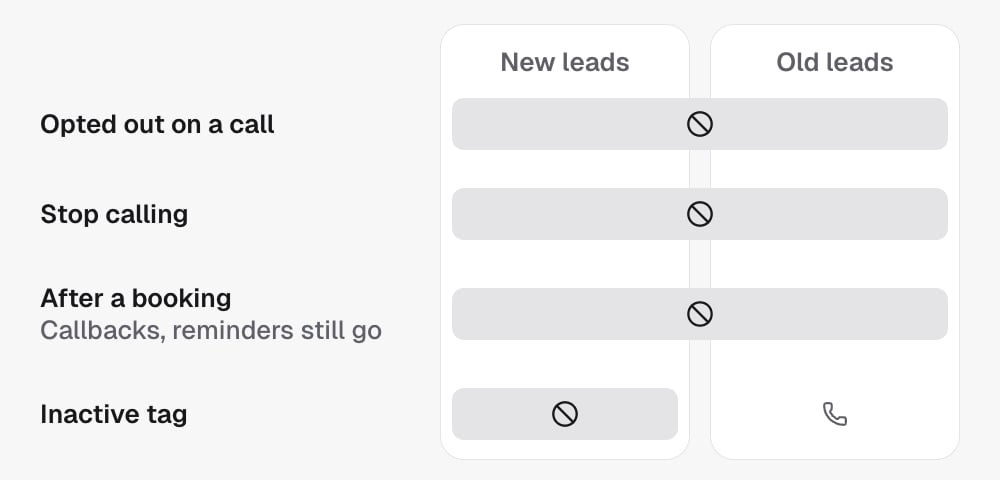
Your own test leads
You will dial yourself and your team while building. Mark those contacts as internal withPATCH /api/contacts/{contactId} and isInternal: true,
identifying the contact by contactId, or by phone number with
idType: phone, with the project’s locationId. The response’s
actionResults reports each flag as saved, or unconfirmed when the save
failed part-way. In the dashboard it is Mark as internal on the contact, and
it covers that phone number across the sub-account, past calls included.
- Their calls are left out of every performance figure: lead counts, booking and transfer rates, pickup, trends and the heatmap.
- Their cost is kept. The minutes were really spent and really billed, so the dashboard stays in step with your wallet.
- They still get called. The mark changes reporting only.
GET /api/contacts lists them by default with isInternal set on each row.
Send internal=only to see just them, or internal=exclude to hide them.
Clear the mark with isInternal: false.
Adding contacts by API
For a sub-account that keeps its contacts on the platform (no CRM connected), post one lead at a time:contacts:write. phone is required. first_name, last_name
(or name), email, timezone, address1, city, state and postalCode
are optional, and so is any of the sub-account’s custom fields, by its key or
its name. A number already in the sub-account updates that contact instead of
adding it twice, and a blank never erases a value. A new contact starts any
campaign whose trigger is “New contact”. The response is 201 for a new
contact and 200 for an update, with the contact’s id either way.
A form, Zapier or Make step that cannot set a header can post the same body to
the sub-account’s lead link instead, shown under API and webhook on the
Contacts page. The secret in that link is its only credential: keep it private,
and regenerate it from the same place if it leaks.
A sub-account with a CRM keeps its contacts there and answers 400.
Reading, updating and deleting those contacts, defining the custom fields your
prompts read, and rotating the lead link are all in
Contacts without a CRM.
Finding contacts
Sort with
sortBy (leadName, phoneNumber, projectName, dateAdded,
callCount) and sortOrder (asc, desc). Page with page and limit.
Project ids come from GET /api/v2/projects; disposition takes the outcome
constants in What your agent records. On one contact,
include accepts calls to return their calls with the record.
Boundaries
- A contact is unique per phone number within a project.
projectNameon a write is a display label only.locationIdis the tenant identity.- Marking a contact internal never suppresses a call. Use the do-not-call flag for that.
In the API
- List contacts; project filter values come from List projects
- Get contact, with
include=callsfor the person’s calls - Update contact sets or clears
doNotCallandisInternal - Add a contact posts a lead into a sub-account that keeps its contacts on the platform (no CRM connected)
- Every field above is defined in the Glossary
Related
- Call records hold the per-call detail behind each contact.
- Backfill existing leads enrols contacts that were already in the CRM.