
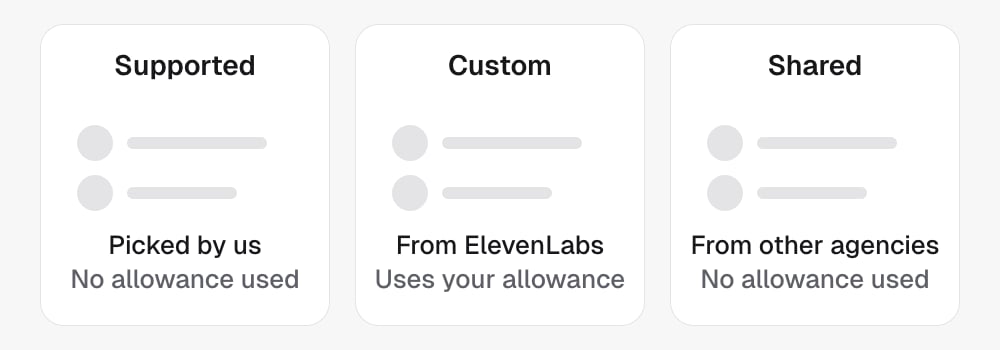
voiceId, picked from its voice list: the
curated catalogue, the voices your agency added to its own library, and voices
other agencies added. In the dashboard’s voice picker these are the
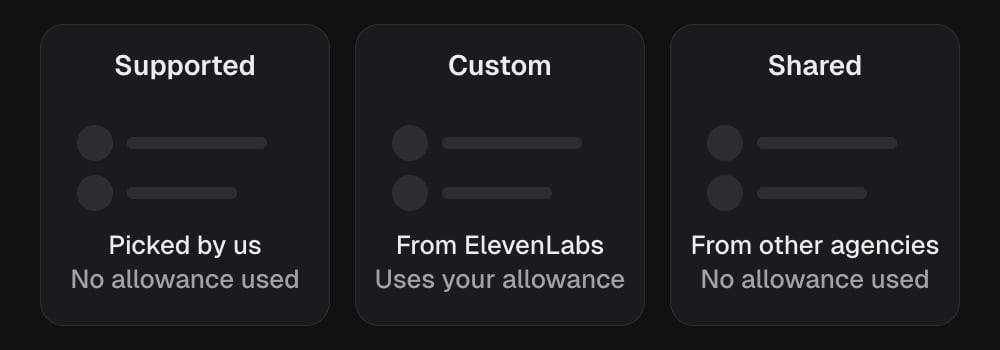
Supported, Custom and Shared tabs.
The voice list
List voices returns every voice an agent can speak with. Each row has asource:
Your own voices come first, then shared ones, then the catalogue. Which shared
voices an agent can use depends on the agent, and so does the id that selects
each of your own, so pass its
agentId.
Every row reads as:
Filter the list with
accent, gender, region and age as query
parameters. The filters narrow the curated catalogue only. Own and shared
voices have no attributes and no preview clip, so they are always listed.
The detail endpoint returns one voice from your list, with two more fields:
region (a regional grouping such as US, UK, AU or ES) and isCustom,
which is true for a voice that is not in the curated catalogue. Such a voice
is described by gender, accent and age, never by name. Any id not in your
list is a 404.
If the provider cannot be reached to describe a voice from your list that is
not in the curated catalogue, the detail endpoint still answers 200, with
degraded: true and a voice carrying the id alone. Read that as “unknown
right now”, not “gone”.
Your voice library
Your agency can add voices from ElevenLabs’ public voice library, up to your plan’s allowance. In the dashboard this is the Custom tab of the voice picker: Add voice opens a search, and the tab shows how much of your allowance is used.- Find a voice. Search with a
query: a name, a description, or a provider voice id, which matches exactly. Each hit has aproviderVoiceId,nameanddescription. Search needsvoices:writeeven though it changes nothing. - Add it. Send the
providerVoiceId, and adisplayNameof up to 200 characters if you want your own label. The label is shown only to your agency. The response is the whole library, so no second read is needed. - Read the library. Each added voice has its
providerVoiceId,displayName,addedAtandvoiceIds, the ids that select it on an agent. Use the one List voices returns for the agent you are setting.used,limitandremainingreport the allowance.limitandremainingare empty (null) when your plan has no limit. - Remove it. Preview first:
agentCount,agentNamesandfallbackVoiceIdsay which agents would move and to which voice. Removing moves every agent on the voice to the default voice, then frees the slot. The response reportsreassignedAgents, andincompleteAgentscounts agents that could not be moved. A non-zeroincompleteAgentsis work to do: those agents are still on the removed voice.
Shared voices
A voice one agency adds is offered to other agencies too, asshared. The
label that agency gave it stays with them; everyone else sees the provider’s
own name. Not every agency sees every shared voice: which ones an agent can
speak with depends on the agent.
A shared voice is selected like any other. It does not count against your
allowance, and it is not yours to remove.
Choosing a voice for an agent
Setconfig.voice.voiceId on the agent. Four more settings live beside it and
shape how the voice comes across:
Two related settings sit under
config.language: language, and
denoisingMode, which cleans up what the agent hears. no-denoise leaves the
lead’s audio alone, noise-cancellation removes background noise, and
noise-and-background-speech-cancellation also filters out other people
talking near the lead.
The dashboard walk-through of these settings is in The voice.
Testing a voice
Preview audio tells you how a voice reads a sentence. It does not tell you how leads respond to it. To find that out, run two variants of the agent that differ only in voice and compare their results. See Run a split test.Boundaries
- A curated
voiceIdworks on any agent in your agency. An own or shared voice’s id works on the agents List voices returns it for. - Own and shared voices have no preview clip, and the attribute filters never hide them.
- The allowance counts the voices you added. Shared voices are free to use.
- Voice settings belong to the agent, not the campaign. Two campaigns on one agent sound the same.
- In a split test, the
voiceblock is one of the per-variant settings, so variants may sound different.
In the API
- List voices and Get voice
- List added voices, Search for a voice to add and Add a voice
- Preview removing a voice and Remove a voice
- Update agent sets
config.voiceandconfig.language - Every field above is defined in the Glossary
Related
- The voice is the dashboard view of these settings.
- Agent split tests is how you test one voice against another.