
Prerequisites
- The
idof the agent whose campaign you are copying. - The
locationIdof the target project. It can be the same project. See Agencies, projects and sub-accounts. - The target project is connected. A
disconnectedproject cannot receive a campaign. - An API key with
agents:write.
Step 1: Choose what to copy
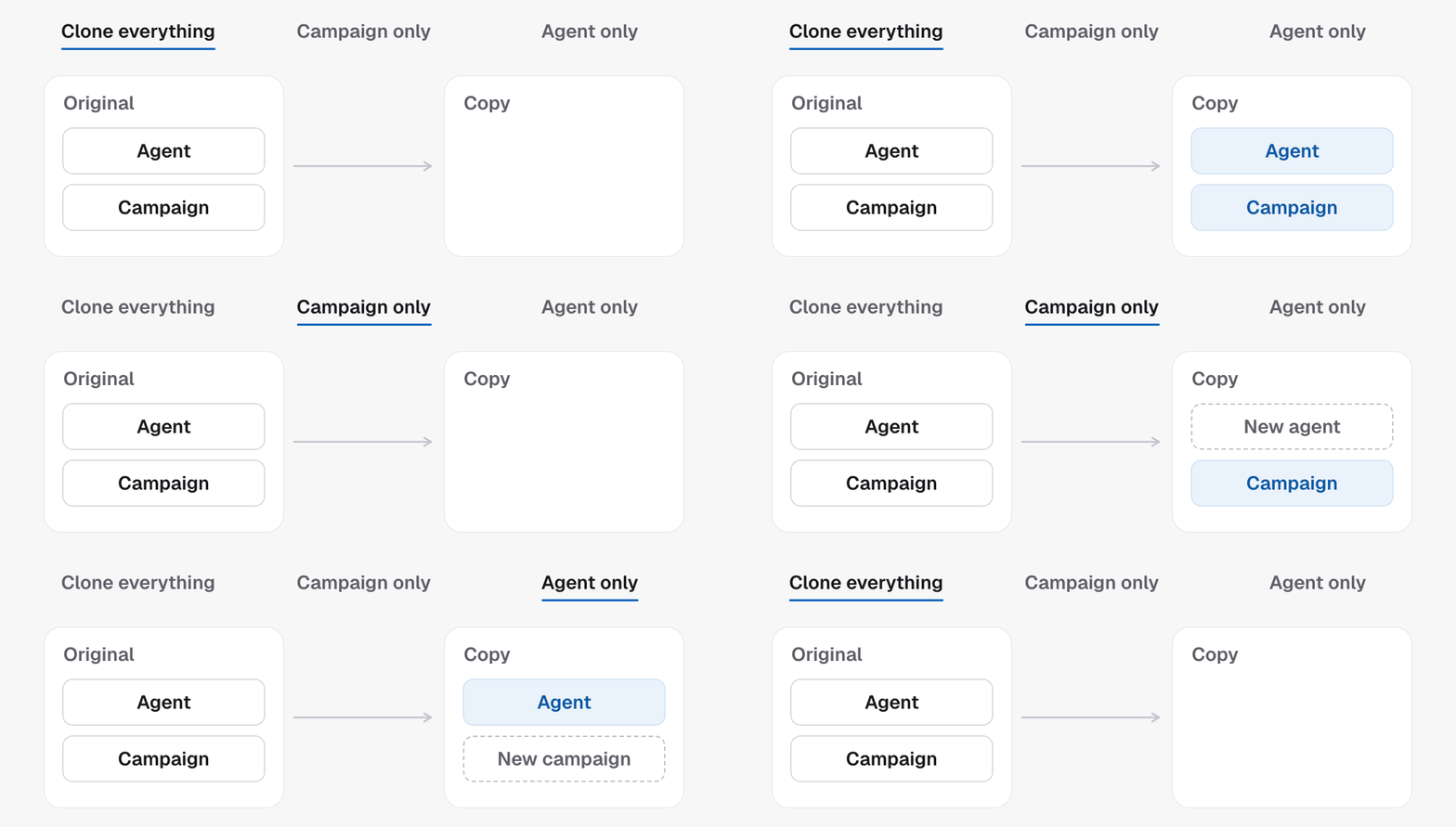
Pick
everything when in doubt. It is the only mode that copies both the
campaign and the agent.
Step 2: Pick the trigger tags
activeTags sets the trigger for the clone. One rule decides them: a tag
drives one campaign per sub-account.
- Cloning into a different sub-account: the same tags are fine, and usually what you want.
- Cloning into the same sub-account: use different tags, or the two campaigns would compete for the same contacts.
Not just tags.
contact_created, “start on a new contact”, follows the same
rule, on every CRM: two campaigns in one sub-account that both start on a new
contact will not both run, because the matcher fires the first one it finds and
does not skip paused campaigns. The clone is refused if it would make a second.Step 2b: Cloning onto a different CRM
A sub-account keeping its contacts in TFU AI and one on GoHighLevel do not start campaigns on the same events: one has tags and pipelines, the other has new contacts and its own custom fields. So a copy that crosses between them does not inherit what starts the original. It arrives with no trigger, and the go-live gate asks for one.- Some triggers cannot cross at all. A campaign that starts when a custom field is set only exists on a sub-account with no CRM, so cloning it onto a CRM sub-account is refused.
- The agent still crosses fine. Where the script is what you wanted to keep,
agentmode is the cleaner copy: it carries the voice and the script and builds the campaign fresh in the target.
Step 3: Clone
Call Clone agent:mode applied, the new campaignId, the agentId
that owns it, and the full agent and campaign records. The agentId is
always a new agent: a copy of the source in everything and agent mode, a
fresh one in campaign mode. Each campaign keeps its own agent.
The request accepts an Idempotency-Key header. Send one, and a retry after a
timeout returns the same clone instead of a second one.
Step 4: Re-point what does not travel
A copy is not a twin. Three things are per sub-account and need your attention before the clone goes live.- Phone numbers. The clone’s
fromNumbersis empty. Assign or buy one. See Phone numbers and caller ID. - Calendars, tags and fields. Ids are per sub-account. Cloning into a different one clears the bound calendars, on the campaign, on its calendar rules and on any booking step in the workflow, and clears the pipeline stages a stage trigger named, so you re-pick them in the target rather than inherit a binding that points back at the source. A “move to stage” or “set field” step in the workflow still carries its id and has to be re-pointed by hand. Look them up with GoHighLevel resources, or, for a sub-account that keeps its contacts here, on its own calendars and custom fields.
- Live state. The clone starts paused. Test it, then set
active: true.
Next steps
- Test your agent before the first lead does.
- Go live for the three things a campaign needs.
- Master Agent when copies must stay in step.