
Live Transfer connects a caller to a person while the call is still active. Add the capability in Skills & Tools, then configure its destination and handoff message. These settings belong to that capability on the selected campaign.

Choose a destination

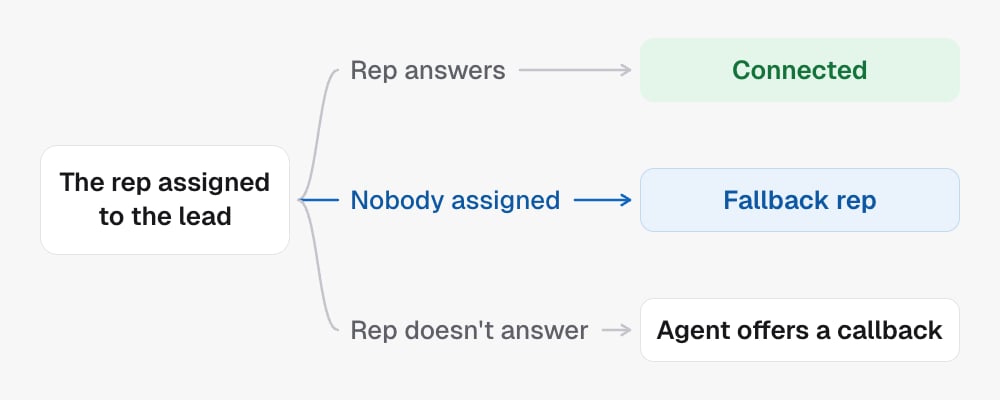
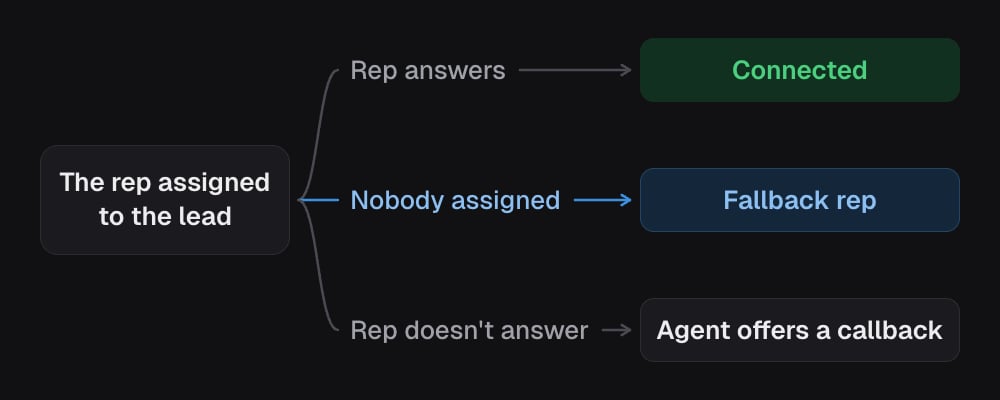
Under Who takes these calls, pick The rep assigned to the lead, A team or One specific person, or type a phone number. With The rep assigned to the lead, the Fallback rep takes the call when the lead has nobody assigned in your CRM, or that rep has no phone number. It is not tried when the assigned rep doesn’t answer: the agent offers a callback instead. Transferring to the rep assigned to the lead. If the rep answers, the caller is connected. If nobody is assigned, the fallback rep takes the call. If the rep doesn't answer, the agent offers a callback. Transferring to the rep assigned to the lead. If the rep answers, the caller is connected. If nobody is assigned, the fallback rep takes the call. If the rep doesn't answer, the agent offers a callback. Advanced routing sends callers to different people based on conditions you write, like “the caller speaks Spanish”. The agent picks the route whose condition fits the call, and Default covers everything else. Review existing routes before changing the default: a matching route can select another destination.
Set the handoff message

The handoff message is what the agent says as it transfers. When should the agent use this? controls when it offers a transfer. Changing either should preserve the destination and the other installed abilities.

In the API

  • Update campaign installs or edits it under capabilities.live_transfer: the destination as config.transferNumber or config.transferToAssignedUser, the handoff line as config.transferMessage
  • Get campaign reads the current setting
  • The tool library lists every capability