> ## Documentation Index
> Fetch the complete documentation index at: https://docs.teamfollowup.ai/llms.txt
> Use this file to discover all available pages before exploring further.
> ## Agent Instructions
> Use the public API base URL: https://api.teamfollowup.ai/api.
> Authenticate public API requests with Authorization: Bearer YOUR_API_KEY.
> Use product-owned terms: agents, campaigns, projects (GoHighLevel sub-accounts), contacts, calls, outcomes, skills, cadences, phone numbers.
> Scope requests by locationId rather than projectName.
> Read the guide linked from each API reference group before recommending an endpoint.
# Live Transfer
> Configure where this capability sends callers and what it says during the handoff.
Live Transfer connects a caller to a person while the call is still active.
Add the capability in **Skills & Tools**, then configure its destination and
handoff message. These settings belong to that capability on the selected campaign.
## Choose a destination
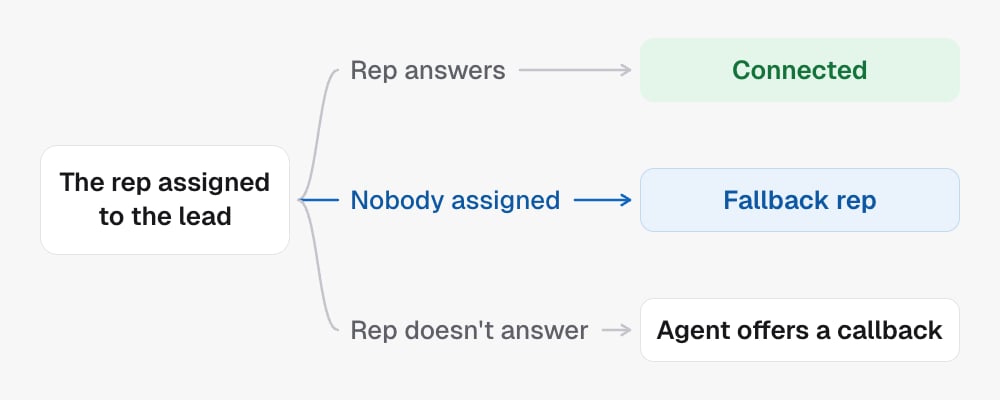
Under **Who takes these calls**, pick **The rep assigned to the lead**, **A
team** or **One specific person**, or type a phone number.
With **The rep assigned to the lead**, the **Fallback rep** takes the call when
the lead has nobody assigned in your CRM, or that rep has no phone number. It is
not tried when the assigned rep doesn't answer: the agent offers a callback
instead.
 **Advanced routing** sends callers to different people based on conditions you
write, like "the caller speaks Spanish". The agent picks the route whose
condition fits the call, and **Default** covers everything else. Review existing
routes before changing the default: a matching route can select another
destination.
## Set the handoff message
The handoff message is what the agent says as it transfers. **When should the
agent use this?** controls when it offers a transfer. Changing either should
preserve the destination and the other installed abilities.
## In the API
* [Update campaign](/api-reference/campaigns/update-campaign) installs or edits it under `capabilities.live_transfer`: the destination as `config.transferNumber` or `config.transferToAssignedUser`, the handoff line as `config.transferMessage`
* [Get campaign](/api-reference/campaigns/get-campaign) reads the current setting
* [The tool library](/skills/tool-library) lists every capability
**Advanced routing** sends callers to different people based on conditions you
write, like "the caller speaks Spanish". The agent picks the route whose
condition fits the call, and **Default** covers everything else. Review existing
routes before changing the default: a matching route can select another
destination.
## Set the handoff message
The handoff message is what the agent says as it transfers. **When should the
agent use this?** controls when it offers a transfer. Changing either should
preserve the destination and the other installed abilities.
## In the API
* [Update campaign](/api-reference/campaigns/update-campaign) installs or edits it under `capabilities.live_transfer`: the destination as `config.transferNumber` or `config.transferToAssignedUser`, the handoff line as `config.transferMessage`
* [Get campaign](/api-reference/campaigns/get-campaign) reads the current setting
* [The tool library](/skills/tool-library) lists every capability