> ## Documentation Index
> Fetch the complete documentation index at: https://docs.teamfollowup.ai/llms.txt
> Use this file to discover all available pages before exploring further.
> ## Agent Instructions
> Use the public API base URL: https://api.teamfollowup.ai/api.
> Authenticate public API requests with Authorization: Bearer YOUR_API_KEY.
> Use product-owned terms: agents, campaigns, projects (GoHighLevel sub-accounts), contacts, calls, outcomes, skills, cadences, phone numbers.
> Scope requests by locationId rather than projectName.
> Read the guide linked from each API reference group before recommending an endpoint.
# Contacts and contact controls
> Find the right person, inspect their calls and understand do-not-call and internal-contact settings.
Contacts are the people associated with calls and CRM records. Finding a contact
does not enroll them into a campaign or place a call.
## Inspect a contact
Choose the project, use the filters to find the person, and open their contact
to review their details and call history.
A name or phone number can appear in several locations. Confirm the location
and identity before changing a contact's calling status.
## Do-not-call status
Setting do-not-call and clearing it are explicit contact actions. Clearing it
does not itself enroll the person, trigger an immediate call or override the
campaign's other eligibility rules. To stop a scheduled campaign attempt, also
inspect the relevant [queue and lead state](/campaigns/pipeline).
Report the actual saved status. Do not infer that a contact is blocked or
unblocked from a chat message alone.
## Internal contacts
Marking a contact internal changes how reporting treats that contact. It is a
reporting control, not a substitute for do-not-call or removing someone from
a campaign queue.
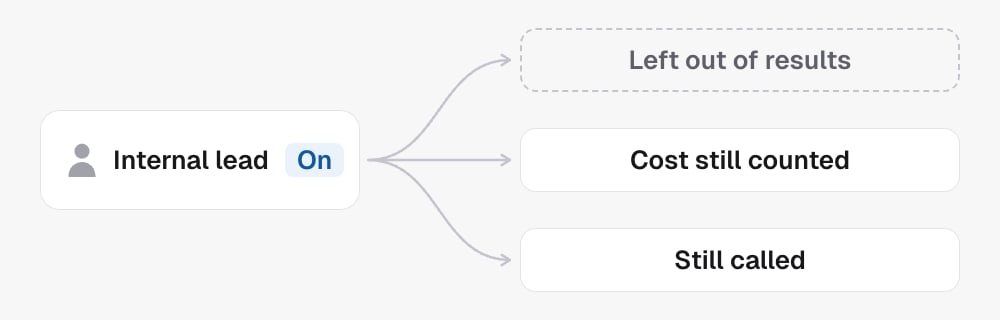
 Use it for the intended internal/test contact and check the
result before explaining any effect on totals.
See [Calls](/concepts/call-history) for individual records and
[Analytics](/concepts/analytics) for aggregate results.
## In the API
* [List contacts](/api-reference/contacts/list-contacts) finds the person
* [Get contact](/api-reference/contacts/get-contact) with `include=calls` shows their calls
* [Update contact](/api-reference/contacts/update-contact) sets `doNotCall` and `isInternal`
Use it for the intended internal/test contact and check the
result before explaining any effect on totals.
See [Calls](/concepts/call-history) for individual records and
[Analytics](/concepts/analytics) for aggregate results.
## In the API
* [List contacts](/api-reference/contacts/list-contacts) finds the person
* [Get contact](/api-reference/contacts/get-contact) with `include=calls` shows their calls
* [Update contact](/api-reference/contacts/update-contact) sets `doNotCall` and `isInternal`