> ## Documentation Index
> Fetch the complete documentation index at: https://docs.teamfollowup.ai/llms.txt
> Use this file to discover all available pages before exploring further.
> ## Agent Instructions
> Use the public API base URL: https://api.teamfollowup.ai/api.
> Authenticate public API requests with Authorization: Bearer YOUR_API_KEY.
> Use product-owned terms: agents, campaigns, projects (GoHighLevel sub-accounts), contacts, calls, outcomes, skills, cadences, phone numbers.
> Scope requests by locationId rather than projectName.
> Read the guide linked from each API reference group before recommending an endpoint.
# Importing existing leads
> An outbound campaign capability for bringing existing contacts into its call list.
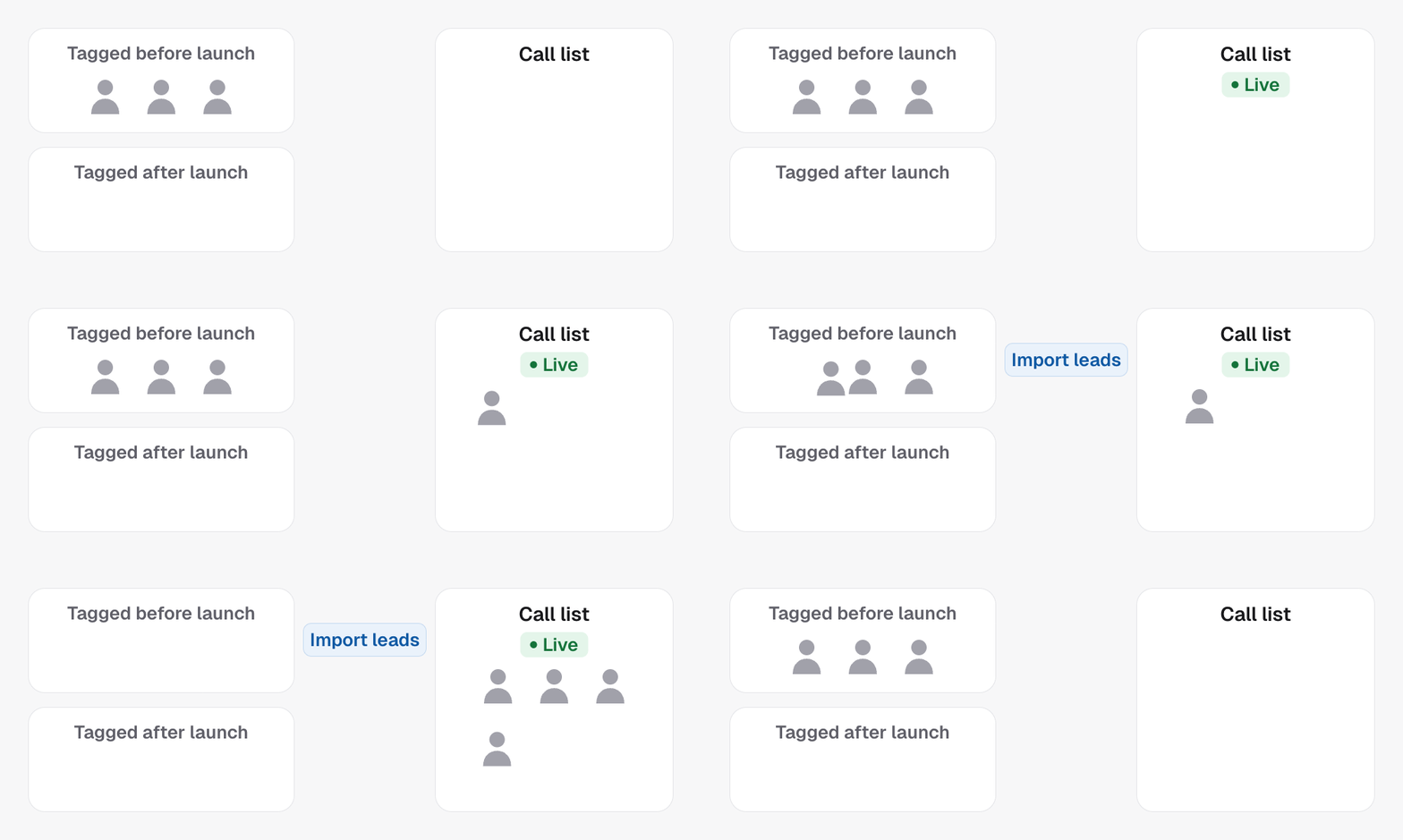
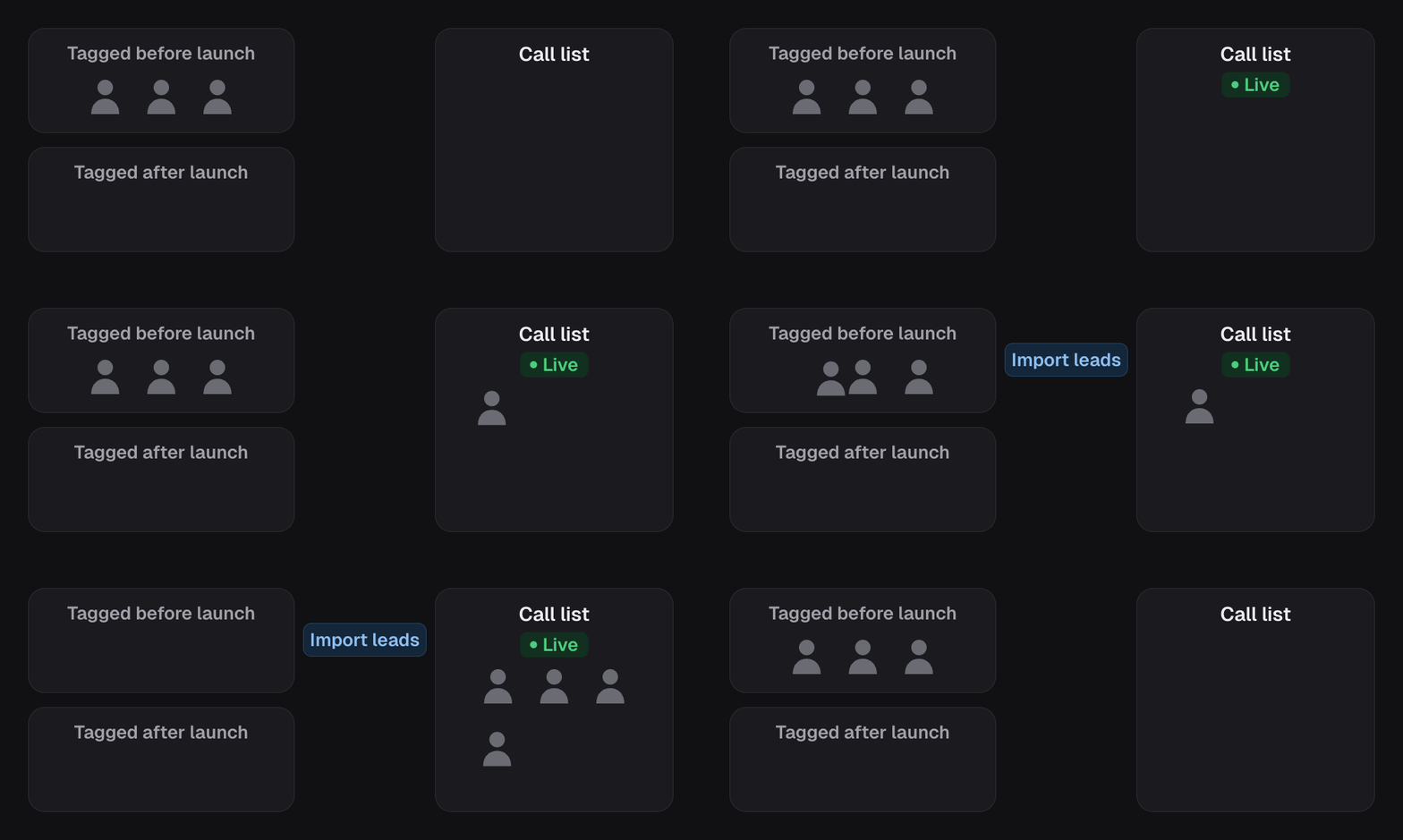
Importing existing leads is a capability of **outbound campaigns**. It brings
eligible contacts already in your CRM into the campaign's call list. It is not
available for inbound or confirmation campaigns.
An outbound campaign's current trigger enrols someone when an entry tag is
**applied**. Contacts who already carried that tag before the campaign existed
need importing to join it. The import uses the campaign's entry and exclusion
tags to decide who is eligible.
 ## Preview, then decide
"That would import 340 contacts that carry `booked-call` and none of your
exclusion tags." Nothing is enrolled at this stage.
340 is a campaign. 12,000 is a phone bill and a lot of surprised people, and
it almost always means the tag is broader than you thought.
The preview is not a formality. It is the only cheap moment to notice that a tag
you thought meant "booked a call this month" actually means "has ever booked a
call".
If the preview comes back **zero**, the tag on your contacts is almost
certainly not the tag on your campaign. Check the campaign's active tags
against the tag as it is actually spelled in HighLevel. Capital letters do not
matter, but a different word or a missing one does. A contact needs every
active tag to match.
## What happens to them
Imported leads join the [dialing pipeline](/campaigns/pipeline). On a campaign
with speed to lead they get its first call, then the
[cadence](/campaigns/cadences) if it has one; on a power-dialer campaign they
start the cadence at its first step. Everything waits for the
[calling window](/campaigns/calling-window), and the calls are spaced out
rather than placed all at once. The campaign has to be live to import.
## In the API
* [Enroll existing leads](/api-reference/campaigns/enroll-existing-leads) with `dryRun: true` for the count, then `dryRun: false` to import
* [Get pipeline steps](/api-reference/campaigns/get-pipeline-steps) shows where they landed
* [Backfill existing leads](/campaigns/backfill-existing-leads) is the API walkthrough
## Preview, then decide
"That would import 340 contacts that carry `booked-call` and none of your
exclusion tags." Nothing is enrolled at this stage.
340 is a campaign. 12,000 is a phone bill and a lot of surprised people, and
it almost always means the tag is broader than you thought.
The preview is not a formality. It is the only cheap moment to notice that a tag
you thought meant "booked a call this month" actually means "has ever booked a
call".
If the preview comes back **zero**, the tag on your contacts is almost
certainly not the tag on your campaign. Check the campaign's active tags
against the tag as it is actually spelled in HighLevel. Capital letters do not
matter, but a different word or a missing one does. A contact needs every
active tag to match.
## What happens to them
Imported leads join the [dialing pipeline](/campaigns/pipeline). On a campaign
with speed to lead they get its first call, then the
[cadence](/campaigns/cadences) if it has one; on a power-dialer campaign they
start the cadence at its first step. Everything waits for the
[calling window](/campaigns/calling-window), and the calls are spaced out
rather than placed all at once. The campaign has to be live to import.
## In the API
* [Enroll existing leads](/api-reference/campaigns/enroll-existing-leads) with `dryRun: true` for the count, then `dryRun: false` to import
* [Get pipeline steps](/api-reference/campaigns/get-pipeline-steps) shows where they landed
* [Backfill existing leads](/campaigns/backfill-existing-leads) is the API walkthrough