> ## Documentation Index
> Fetch the complete documentation index at: https://docs.teamfollowup.ai/llms.txt
> Use this file to discover all available pages before exploring further.
> ## Agent Instructions
> Use the public API base URL: https://api.teamfollowup.ai/api.
> Authenticate public API requests with Authorization: Bearer YOUR_API_KEY.
> Use product-owned terms: agents, campaigns, projects (GoHighLevel sub-accounts), contacts, calls, outcomes, skills, cadences, phone numbers.
> Scope requests by locationId rather than projectName.
> Read the guide linked from each API reference group before recommending an endpoint.
# The brain
> Everything a TFU Live agent is and knows, written once and used on calls and texts alike. What belongs in it, what does not, and how to write it.
A [TFU Live agent](/agents/tfu-live) has a **Brain** and a
[**Voice**](/agents/tfu-live-voice). The brain is who it is, what it knows and
what it can do. The voice is how it sounds while someone is listening.
Everything in the brain is used twice. The same agent takes the call and
answers the text afterwards, and both read the same brain, so the person who
rings and the person who texts meet the same character with the same facts.
## What goes in it
You rarely open it. Telling the agent what to change is the usual way, and it
edits itself. To read or write it by hand, open **Configure myself** and click the
agent in the middle of the canvas: the whole thing opens full screen. On
screen the brain's writing is called **Instructions**, next to **Workflows** and
**Voice**.
* Who it is and who it works for.
* What it knows: services, hours, prices, policies, the answers to the
questions you get asked every week.
* Why this conversation is happening and where it should go.
* How it treats people, including the difficult ones.
* What it must never do.
* Whether it admits to being an AI, and how.
Around the agent on that same canvas are its workflows, what it can actually
do rather than say. Those are part of the brain too. See
[Capabilities and workflows](/agents/tfu-live-capabilities).
## The one test that sorts everything
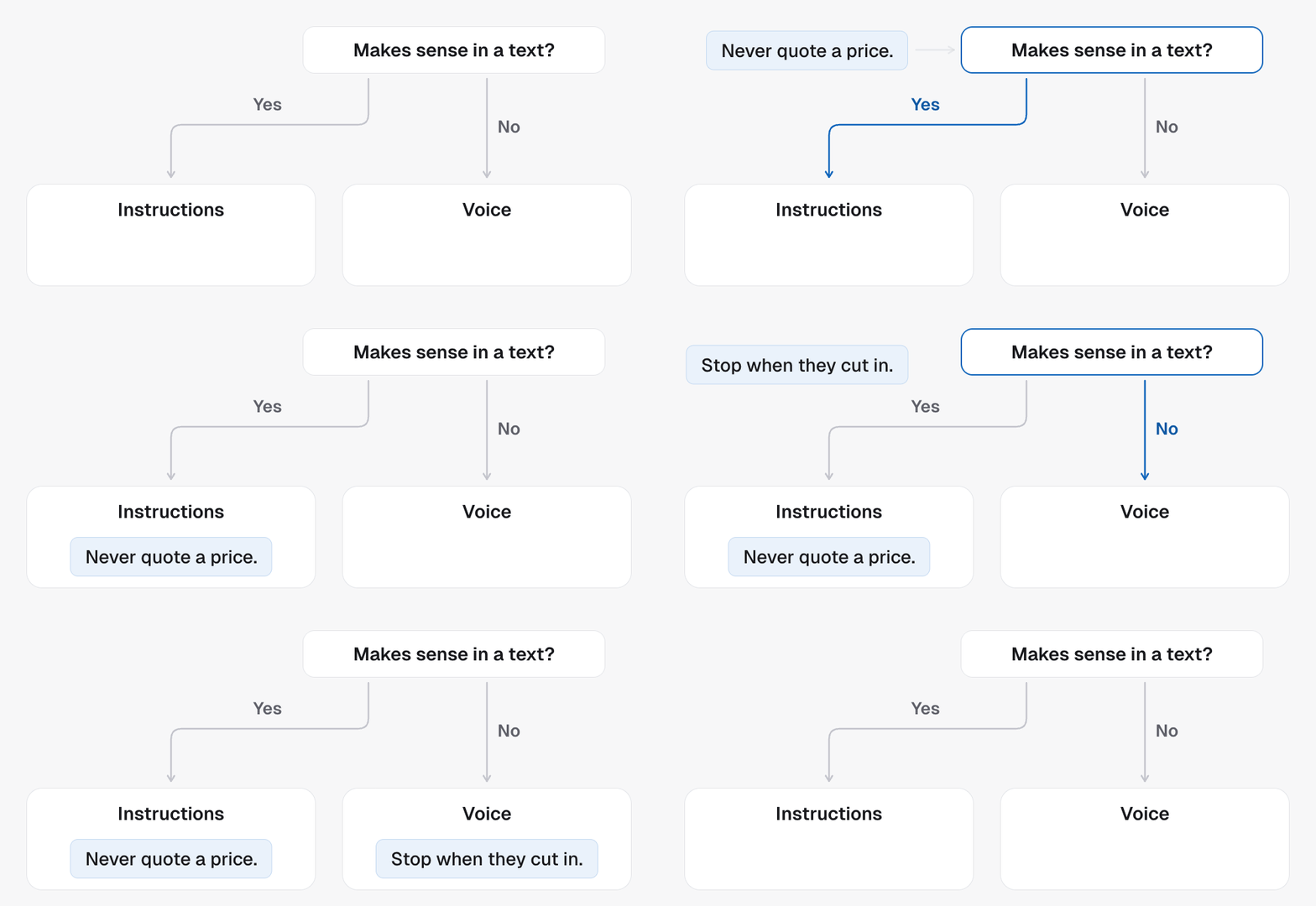
There is exactly one question, and it decides every sentence:
> If the person were reading this instead of hearing it, would it still mean
> anything?
If yes, it belongs in the brain. "Take frustration seriously in one line of
your own." "Never quote a price over the phone." "Accept a clear no the first
time." All of those are just as true in a text message.
If it only makes sense because there is audio, it belongs in the voice. "Stop
talking the moment they cut in." "A small listening sound while they run on."
Neither means anything on a screen.
 This is not a split between personality and facts. Both halves of the brain are
personality and facts together, because the character and the business are the
same on every channel.
## Brief it, do not script it
The same rule as any other agent, and it matters more here. You cannot write
the conversation out, because you do not know what the other person will say.
Brief it like a new hire: here is who you are, here is why you are calling,
here is what to do if they say yes and what to do if they say no, here are the
lines you never cross.
One habit to break. Do not write the lines you want spoken. Give it an example
sentence and you will hear that exact sentence on every call until it stops
sounding like a person. Write the stance and let it find its own words.
* Instead of "say: no problem at all, I completely understand", write "take it
seriously in one line of your own and move to the next useful step".
* Instead of "say: great question", write "do not compliment or rate what they
said".
A short list of what not to do is worth more than paragraphs of description,
because the habits that make an agent sound artificial are few and specific:
repeating the answer back, thanking people for sharing, performing enthusiasm,
asking permission to carry on.
## The lead's own details
`{{first_name}}`, `{{email}}`, the location's custom fields and custom values
work here the way they do on an ordinary agent: the **Variable** button above
the text drops one in, and it is filled from the CRM contact on every call
and every text. A field the contact does not have comes out blank. Use them
for facts the agent should state, and leave how it greets someone to the
brief.
## Every new agent starts with one
A new TFU Live agent arrives with a real brief already written: an adult who
has done this job for years, leads the conversation, stays the same temperature
whether the person is excited or difficult, and admits to being an AI in one
line if asked. It is opinionated on purpose, not a placeholder.
Keep what suits the business, change what does not, and add what it needs to
know. The part you are most likely to add is the facts, because those are the
only part we cannot guess.
## When a change reaches a call
A save is set up as the next version, and calls keep using the current one
until the new version is verified. Calls already running finish on the version
they started on.
The fastest way to hear a change is the chat pane beside the canvas: make the
edit, ask to try it, and talk to the agent yourself.
## Related
* [TFU Live agents](/agents/tfu-live)
* [The voice](/agents/tfu-live-voice)
* [Capabilities and workflows](/agents/tfu-live-capabilities)
* [What an agent is](/agents/overview)
This is not a split between personality and facts. Both halves of the brain are
personality and facts together, because the character and the business are the
same on every channel.
## Brief it, do not script it
The same rule as any other agent, and it matters more here. You cannot write
the conversation out, because you do not know what the other person will say.
Brief it like a new hire: here is who you are, here is why you are calling,
here is what to do if they say yes and what to do if they say no, here are the
lines you never cross.
One habit to break. Do not write the lines you want spoken. Give it an example
sentence and you will hear that exact sentence on every call until it stops
sounding like a person. Write the stance and let it find its own words.
* Instead of "say: no problem at all, I completely understand", write "take it
seriously in one line of your own and move to the next useful step".
* Instead of "say: great question", write "do not compliment or rate what they
said".
A short list of what not to do is worth more than paragraphs of description,
because the habits that make an agent sound artificial are few and specific:
repeating the answer back, thanking people for sharing, performing enthusiasm,
asking permission to carry on.
## The lead's own details
`{{first_name}}`, `{{email}}`, the location's custom fields and custom values
work here the way they do on an ordinary agent: the **Variable** button above
the text drops one in, and it is filled from the CRM contact on every call
and every text. A field the contact does not have comes out blank. Use them
for facts the agent should state, and leave how it greets someone to the
brief.
## Every new agent starts with one
A new TFU Live agent arrives with a real brief already written: an adult who
has done this job for years, leads the conversation, stays the same temperature
whether the person is excited or difficult, and admits to being an AI in one
line if asked. It is opinionated on purpose, not a placeholder.
Keep what suits the business, change what does not, and add what it needs to
know. The part you are most likely to add is the facts, because those are the
only part we cannot guess.
## When a change reaches a call
A save is set up as the next version, and calls keep using the current one
until the new version is verified. Calls already running finish on the version
they started on.
The fastest way to hear a change is the chat pane beside the canvas: make the
edit, ask to try it, and talk to the agent yourself.
## Related
* [TFU Live agents](/agents/tfu-live)
* [The voice](/agents/tfu-live-voice)
* [Capabilities and workflows](/agents/tfu-live-capabilities)
* [What an agent is](/agents/overview)