> ## Documentation Index
> Fetch the complete documentation index at: https://docs.teamfollowup.ai/llms.txt
> Use this file to discover all available pages before exploring further.
> ## Agent Instructions
> Use the public API base URL: https://api.teamfollowup.ai/api.
> Authenticate public API requests with Authorization: Bearer YOUR_API_KEY.
> Use product-owned terms: agents, campaigns, projects (GoHighLevel sub-accounts), contacts, calls, outcomes, skills, cadences, phone numbers.
> Scope requests by locationId rather than projectName.
> Read the guide linked from each API reference group before recommending an endpoint.
# What your agent is called
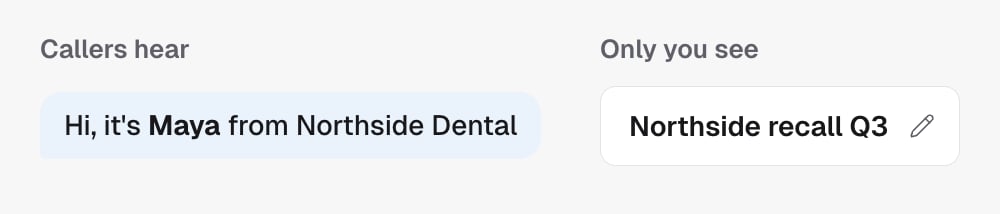
> Rename the agent your leads hear. The spoken name lives in the script and changing it is a script edit; the label at the top of the builder is internal and no caller ever hears it.
There are two names in play, and confusing them is the most common way an agent
ends up introducing itself with the wrong one.
 ## Renaming her
When you say "call her Maya", you almost always mean the **spoken** one. That is
the name in "hi, it's Maya from Northside Dental".
It lives in the [script](/agents/prompt), so changing it is a script edit. Just
ask. It is not something you have to go and do yourself.
The pencil icon at the top of the page changes the **internal label**, which no
lead ever hears. If you rename her there and nowhere else, every call still
says the old name. Renaming the label is not renaming the agent.
A [TFU Live agent](/agents/tfu-live) is different. When its brain says its
name, that name comes from the top of its page, so renaming it there can
change what callers hear.
## The label
Worth keeping tidy for your own sake, especially once you run several campaigns
and the list gets long. Name it after the job it does, not after the persona:
"Northside recall Q3" tells you more at a glance than "Maya" does.
It has no effect on a call.
## In the API
* [Update agent](/api-reference/agents/update-agent) changes the label with `name`
* The spoken name is a script edit: read it with [Get agent](/api-reference/agents/get-agent) and `view=script`, then send the edited `prompt`
## Renaming her
When you say "call her Maya", you almost always mean the **spoken** one. That is
the name in "hi, it's Maya from Northside Dental".
It lives in the [script](/agents/prompt), so changing it is a script edit. Just
ask. It is not something you have to go and do yourself.
The pencil icon at the top of the page changes the **internal label**, which no
lead ever hears. If you rename her there and nowhere else, every call still
says the old name. Renaming the label is not renaming the agent.
A [TFU Live agent](/agents/tfu-live) is different. When its brain says its
name, that name comes from the top of its page, so renaming it there can
change what callers hear.
## The label
Worth keeping tidy for your own sake, especially once you run several campaigns
and the list gets long. Name it after the job it does, not after the persona:
"Northside recall Q3" tells you more at a glance than "Maya" does.
It has no effect on a call.
## In the API
* [Update agent](/api-reference/agents/update-agent) changes the label with `name`
* The spoken name is a script edit: read it with [Get agent](/api-reference/agents/get-agent) and `view=script`, then send the edited `prompt`