> ## Documentation Index
> Fetch the complete documentation index at: https://docs.teamfollowup.ai/llms.txt
> Use this file to discover all available pages before exploring further.
> ## Agent Instructions
> Use the public API base URL: https://api.teamfollowup.ai/api.
> Authenticate public API requests with Authorization: Bearer YOUR_API_KEY.
> Use product-owned terms: agents, campaigns, projects (GoHighLevel sub-accounts), contacts, calls, outcomes, skills, cadences, phone numbers.
> Scope requests by locationId rather than projectName.
> Read the guide linked from each API reference group before recommending an endpoint.
# The knowledge base
> One set of durable business facts per sub account, reused by every agent on it. What goes in, what does not, and how to build the first one from a scan.
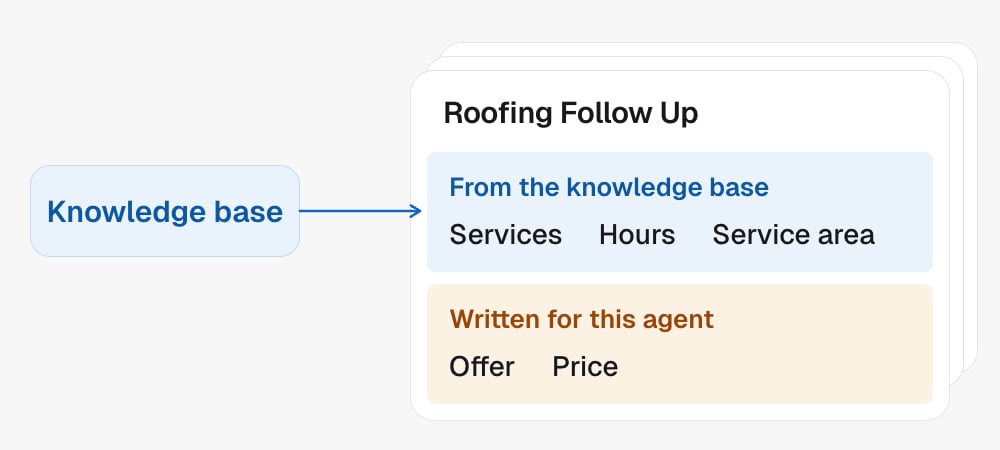
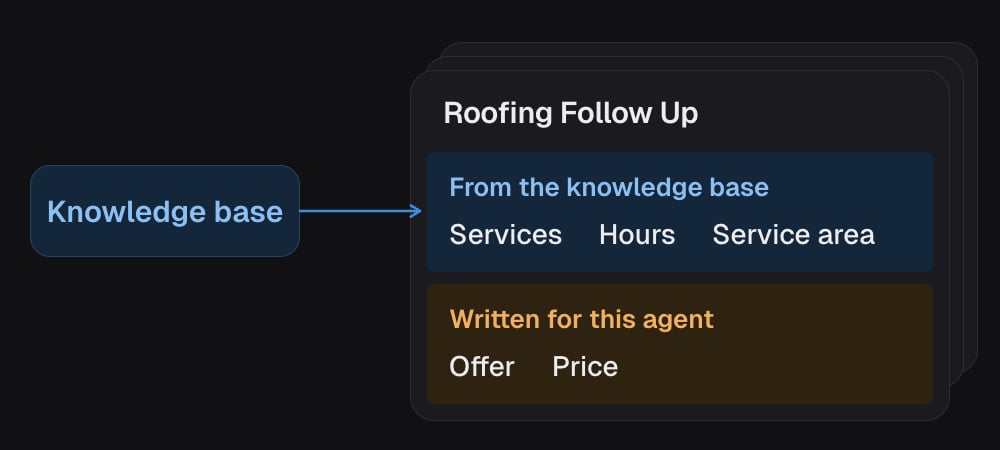
The knowledge base is the reusable business profile: what you do, what you do
not do, where you are, when you are open. It sits at the **project** level, so
one sub account has one knowledge base, and Co-author reads it whenever it
writes a script for an agent on that sub account.
That is the point of it. Facts about your business stop being retyped into every
script. If a fact changes after a script was written, check that agent's script
too.
 ## It is a recommendation, never a requirement
A project with no knowledge base works fine. Agents build, scripts write,
campaigns run. Nothing is blocked.
So treat it as something worth having when it helps, not a form to fill in first.
The moments it earns its keep are obvious when they arrive: you are writing a
first script and there are no business facts to work from, or you notice you have
typed the same detail into three agents.
## What goes in
Durable facts, the ones that are still true next quarter and true for every
campaign:
* What the business actually does
* Services in scope, and services explicitly **out** of scope
* Location, service area, contact channels, website
* Opening hours
* Permanent disclaimers, like "licensed in California only"
## What does not go in
This is the more useful half of the list, because the temptation runs one way.
Everything here belongs to a **campaign**, not the business, and putting it in the
knowledge base means every agent on the sub account inherits it.
| Not this | Where it belongs |
| - | - |
| The offer or price for one campaign ("free strategy call", "\$200 cleaning") | This agent's [script](/agents/prompt) |
| Qualifying criteria ("we only book leads making \$5k+") | This agent's script |
| Lead source ("these came from the LinkedIn ad") | This agent's script |
| What ad, landing page, form or lead magnet caught their eye | This agent's script |
| Trigger tags, dialer schedules, post call logic | The [campaign](/campaigns/overview) |
| Calendar IDs, webhook URLs, custom value placeholders, internal SOPs | Operational config, nowhere near the knowledge base |
| Testimonials, social proof, customer revenue numbers | Marketing copy, not facts |
If a campaign fact comes up while you are building the knowledge base, it is
not wasted. It is exactly what the script intake needs. Set it aside for the
script rather than filing it here.
## Building the first one
Four short phases.
Finds the business on the web by its name, whatever CRM the sub account
uses, and shows you the likely matches. You say which one is yours, and its
public profile is read: what it does, where it is, how to reach it.
If nothing turns up, that is not a failure. It just means the questions come
from you instead.
Once you have said which business is yours, its website gets read straight
away rather than asking a second time.
Some sites give up very little: a single page funnel, or a page that builds
itself in the browser. That is normal, and it means a couple more questions.
Only what the scans did not answer, and only two questions or so unless you
volunteer more. Usually: what the business actually does, what is out of
scope, hours, and anything notable that is not online, like a
specialisation or a permanent disclaimer.
If the scans already gave enough for a useful profile, this phase gets
skipped entirely. That is the preferred outcome.
The draft is shown to you in full before anything is written. Nothing is
saved until you have seen it and said so.
## What a good one looks like
* **Plain English paragraphs.** Two or three of them. Not a bullet dump.
* **Tight.** Roughly 120 to 220 words. One screen.
* **General facts only**, in the terms above.
* **Written in the language of the business**, which is usually the language of
its website, even when you happen to be chatting in another one. Business
names, service names, URLs and phone numbers stay exactly as they are.
Noise gets discarded rather than preserved: testimonials, calendar links, CRM
permission flags, placeholder IDs, social URLs that are not actually a contact
channel.
Where two sources disagree, the more likely one wins and you can correct it. A
sub account marked country US with a UK postcode is a UK business, written as
one, rather than a paragraph of caveats about the conflict.
## Editing an existing one
Make the smallest useful change and leave the rest alone. A correction is a
correction, not a reason to redraft the whole profile, unless you actually want a
rewrite.
Facts written here are asserted to real leads on real calls. An unsourced
negative claim is the dangerous kind: "we don't offer online training" is
something the agent will state as fact and cannot walk back mid call. If a fact
did not come from your scan, your website, or you, it does not belong in the
knowledge base.
## In the API
* [Update project](/api-reference/projects/update-project) sets `knowledgeBase` for the sub account
* [Get project](/api-reference/projects/get-project) reads it back
* Every agent on the project reuses it; one campaign's facts go in [the script](/agents/prompt)
## It is a recommendation, never a requirement
A project with no knowledge base works fine. Agents build, scripts write,
campaigns run. Nothing is blocked.
So treat it as something worth having when it helps, not a form to fill in first.
The moments it earns its keep are obvious when they arrive: you are writing a
first script and there are no business facts to work from, or you notice you have
typed the same detail into three agents.
## What goes in
Durable facts, the ones that are still true next quarter and true for every
campaign:
* What the business actually does
* Services in scope, and services explicitly **out** of scope
* Location, service area, contact channels, website
* Opening hours
* Permanent disclaimers, like "licensed in California only"
## What does not go in
This is the more useful half of the list, because the temptation runs one way.
Everything here belongs to a **campaign**, not the business, and putting it in the
knowledge base means every agent on the sub account inherits it.
| Not this | Where it belongs |
| - | - |
| The offer or price for one campaign ("free strategy call", "\$200 cleaning") | This agent's [script](/agents/prompt) |
| Qualifying criteria ("we only book leads making \$5k+") | This agent's script |
| Lead source ("these came from the LinkedIn ad") | This agent's script |
| What ad, landing page, form or lead magnet caught their eye | This agent's script |
| Trigger tags, dialer schedules, post call logic | The [campaign](/campaigns/overview) |
| Calendar IDs, webhook URLs, custom value placeholders, internal SOPs | Operational config, nowhere near the knowledge base |
| Testimonials, social proof, customer revenue numbers | Marketing copy, not facts |
If a campaign fact comes up while you are building the knowledge base, it is
not wasted. It is exactly what the script intake needs. Set it aside for the
script rather than filing it here.
## Building the first one
Four short phases.
Finds the business on the web by its name, whatever CRM the sub account
uses, and shows you the likely matches. You say which one is yours, and its
public profile is read: what it does, where it is, how to reach it.
If nothing turns up, that is not a failure. It just means the questions come
from you instead.
Once you have said which business is yours, its website gets read straight
away rather than asking a second time.
Some sites give up very little: a single page funnel, or a page that builds
itself in the browser. That is normal, and it means a couple more questions.
Only what the scans did not answer, and only two questions or so unless you
volunteer more. Usually: what the business actually does, what is out of
scope, hours, and anything notable that is not online, like a
specialisation or a permanent disclaimer.
If the scans already gave enough for a useful profile, this phase gets
skipped entirely. That is the preferred outcome.
The draft is shown to you in full before anything is written. Nothing is
saved until you have seen it and said so.
## What a good one looks like
* **Plain English paragraphs.** Two or three of them. Not a bullet dump.
* **Tight.** Roughly 120 to 220 words. One screen.
* **General facts only**, in the terms above.
* **Written in the language of the business**, which is usually the language of
its website, even when you happen to be chatting in another one. Business
names, service names, URLs and phone numbers stay exactly as they are.
Noise gets discarded rather than preserved: testimonials, calendar links, CRM
permission flags, placeholder IDs, social URLs that are not actually a contact
channel.
Where two sources disagree, the more likely one wins and you can correct it. A
sub account marked country US with a UK postcode is a UK business, written as
one, rather than a paragraph of caveats about the conflict.
## Editing an existing one
Make the smallest useful change and leave the rest alone. A correction is a
correction, not a reason to redraft the whole profile, unless you actually want a
rewrite.
Facts written here are asserted to real leads on real calls. An unsourced
negative claim is the dangerous kind: "we don't offer online training" is
something the agent will state as fact and cannot walk back mid call. If a fact
did not come from your scan, your website, or you, it does not belong in the
knowledge base.
## In the API
* [Update project](/api-reference/projects/update-project) sets `knowledgeBase` for the sub account
* [Get project](/api-reference/projects/get-project) reads it back
* Every agent on the project reuses it; one campaign's facts go in [the script](/agents/prompt)